
How to Repurpose Podcast Content for More Reach (2026)

80% of B2B podcasts generate zero attributable pipeline. The reason is almost always the same: the team records, edits, publishes, and starts the cycle over.
If you’re doing the same, here’s what you’re missing
Your every episode is raw material for short-form video, SEO blog posts, email sequences, LinkedIn carousels, and sales enablement assets.
And yes, you must leverage all that to succeed.
Luckily, you’re on the right page.
This guide breaks down the repurposing system, the tools that automate most of it, and three playbooks matched to your team size and goals.
Let’s get started.
What Is Podcast Repurposing?
Podcast repurposing is the practice of converting one recorded episode into multiple content formats designed for different platforms and buyer stages.
Pro tip: Don’t look at the audio file as the final product. Look at it as your source material.
A single 45-minute conversation can produce short video clips, a long-form blog post, an email newsletter, quote graphics, a LinkedIn carousel, and a sales one-pager.
Each asset reaches a different audience at a different moment in the buying journey, from first discovery to active evaluation
How to repurpose a podcast into multiple content pieces (system overview)
The core model is content atomization: one long-form recording becomes dozens of derivative assets distributed across the platforms where your buyers actually spend time.
We used that model to turn Tonkean’s Modern Business Operations podcast into 174.36% growth in unique listeners in a single quarter and won a Spotify category ranking.
Pro tip: At Content Allies, the repurposing system starts before the episode records, not after (like you might be tempted to do).
That means we design your conversation structure, segment length, and guest prompts with downstream assets in mind from day one.
When one of our internal podcasts, the Leaders of B2B, followed this model, it produced 43 sales opportunities and $100,500 in attributable revenue directly from podcast content.

Content types to create from every podcast episode
Foundation Inc.’s analysis maps nine distinct content types a single recorded episode can yield. Knowing what to produce before you edit is what separates a content engine from a content graveyard.
Here is the full asset stack
Short-form video content
Cut 3 to 8 vertical clips per episode, each running 15 to 90 seconds. Prioritize moments where the guest makes a strong claim, shares a counterintuitive insight, or reacts visibly. These clips are your top-of-funnel discovery mechanism if you use them as social media posts on YouTube Shorts, Instagram Stories or Reels, TikTok, and LinkedIn.
Example: A B2B SaaS show clips a CFO’s comment on budget allocation during board meetings. The 28-second clip runs on LinkedIn and generates 40 profile views from financial decision-makers in the same week.
And if you need a real example, here’s one from our work with Mark Zuckerberg’s Meta:
Full transcript
Every episode needs a clean, published transcript. This is the master source document for every other asset type.
Transcripts also give search engines something to index. From our experience, you'll see an increase in organic traffic from episode transcripts and show notes published over 3-6 months.
Unfortunately, most B2B teams skip this step.
SEO blog posts
You can write one blog post per episode, structured around a search query your buyers actually type. Add subheadings, key takeaways, and embedded media that the audio alone cannot offer.
This is not a transcript dump. It is editorial content that earns compounding search traffic.
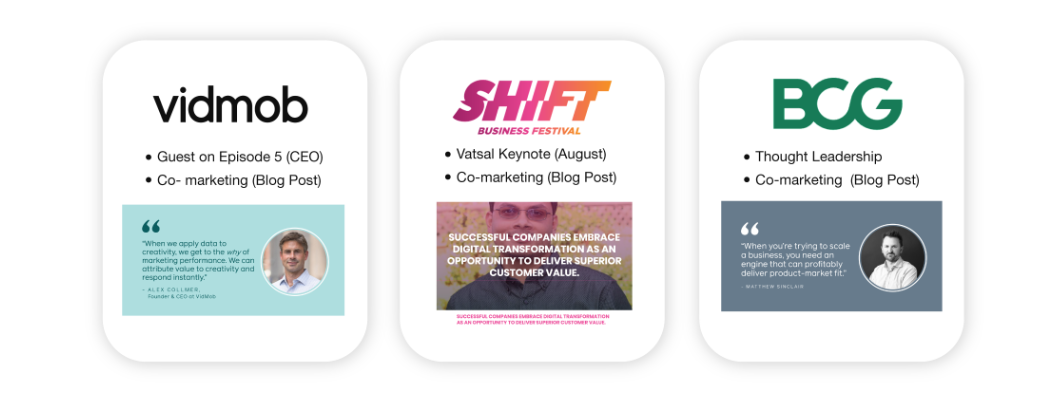
Content Allies helped Meta extend the reach of its podcast by turning interviews with guests like VidMob CEO Alex Collmer, BCG Digital Ventures partner Matthew Sinclair, and Meta VP Vatsal Mehta into additional content.
After appearing on the show, guests promoted the episodes across their personal and company channels, while Content Allies repurposed the conversations into articles published on partner websites (like this).
This created extra visibility and traffic both for the podcast and its guests.
Email newsletter
Summarize the episode’s top three takeaways with a link to the full audio. For B2B shows, email sequences derived from episodes are strong nurture formats at every buyer stage.
Fame’s B2B framework recommends five email sequences per 30-minute episode, each targeting a different stage of the buyer journey.
LinkedIn carousel
A five-page PDF carousel titled “5 Lessons from [Guest] on [Topic]” consistently outperforms native video on LinkedIn.
The format works because 66% of LinkedIn’s audience consumes content on mobile, where video quality degrades and captions often fail to display.
Carousels let buyers consume at their own pace, without an external click.
Quote graphics
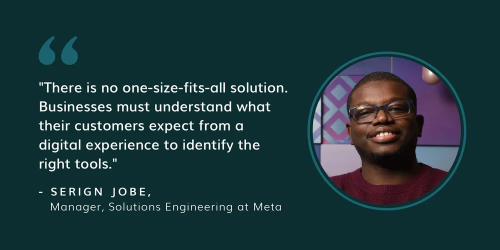
Three to five static images per episode featuring the guest’s most memorable lines. These work as scroll-stopping assets with near-zero production cost using Canva templates. Batch-create them in the same session as your clips.
Here’s how we did it at Content Allies in our work with Meta:
Audiograms
Short waveform video clips featuring a static image and animated audio visualization. Headliner handles this on a free tier. Audiograms work on Instagram and X for audiences that do not engage with full video formats.
Sales enablement assets
Extract key statistics, client quotes, or frameworks from the episode and package them into one-pagers, talk tracks, or slide deck content for the sales team. This is the most frequently skipped asset type, and the one with the most direct revenue impact.
Example: A guest’s comment on compliance costs becomes a talking point in a sales deck targeting regulated industries.
Ebooks and lead magnets
You need four to six thematically connected episodes, compiled and edited into a gated PDF. This turns an ongoing podcast series into a list-building asset and positions the host as a credible authority on the topic.
Why Does Podcast Repurposing Work for B2B Brands?
55% of Americans now listen to podcasts monthly, a record high according to Edison Research 2025.
But the channel’s value is not just reach. It is attention quality.
According to eMarketer, 26% of podcast listeners visit a brand’s website after hearing an ad, and 22% purchase immediately. Compare that to 13% for Instagram and 12% for YouTube.
Basically, branded podcast audiences arrive primed to act.
Repurposing turns that attention into a compounding multi-channel content advantage.
Every episode generates SEO assets that build over time, social content that drives discovery, and email material that nurtures the existing pipeline.
For B2B specifically, podcast-engaged prospects close 23% faster than non-engaged ones. The Fame article we cited above has another interesting finding:
Companies running pipeline-first repurposing strategies see 3x higher ROI compared to teams that publish and move on.
Besides, content repurposing ranks as the fifth most effective content marketing technique for driving traffic and leads according to SEMrush.

For B2B marketing teams already producing podcast content, repurposing is the highest-leverage activity available without adding headcount.
How to Repurpose a Podcast Episode Step-by-Step
Repurposing works best as a system, so here is the five-step workflow used by high-output B2B podcast teams.
Step 1: Create a Transcript and Mine It for Assets
Run the raw audio through a transcription tool like Descript or Castmagic. Once you have the transcript, timestamp the moments that stand out: strong claims, data points, guest reactions, and process explanations.
These timestamps become your production queue for every downstream asset.
Pro tip: Do not re-listen to the full episode when producing derivative content. The timestamped transcript is your map.
Step 2: Cut Short-Form Video Clips
Use OpusClip to generate clips automatically from your video recording. The tool produces 25+ clips per hour of footage with an AI-powered virality score that ranks them by predicted performance.
Export the top clips in vertical format for YouTube Shorts and Instagram Reels, and in square format for LinkedIn.
Add captions to every clip. 85% of viewers watch videos without sound on social platforms, making captions non-optional for B2B audiences.
Step 3: Write an SEO Blog Post
The transcript gives you a first draft. Restructure it around a keyword your buyer types into Google or Perplexity. We advise you to:
Add subheadings.
Remove conversational filler.
Insert supporting links and at least one visual.
Close with three to five key takeaways.
A well-optimized blog post from a 30-minute episode can rank for multiple related queries and generate compounding organic traffic for 12 to 18 months after publication.
Pro tip: Turning your podcast episodes into guest posts published on other authoritative websites is a great content strategy because it will attract valuable backlinks.
Step 4: Build Email Sequences from the Transcript
Do not just summarize the episode. Extract three to five standalone insights, each strong enough to anchor its own nurture email.
Each email needs a clear “so what” connecting the insight to a decision the buyer faces. This is where podcast content converts from brand awareness to an active pipeline.
Step 5: Build Sales Enablement Assets
Pull the most buyer-relevant frameworks, statistics, and guest quotes from the transcript and package them for sales. A talk track, a one-pager, or a single slide in the deck.
Sales reps are significantly more likely to use content formatted for a call context.
Work with sales to identify which episode topics align with current deal conversations before you decide what to package.
Our In-House Podcast Repurposing Approach
As we said above:
Podcast repurposing starts with the episode concept. That’s because you need to make sure you can extract valuable content from each episode.
After you record the full conversation, you turn it into distribution-ready assets like short vertical videos and audiograms for YouTube Shorts, LinkedIn, Instagram Reels, TikTok, and other channels where your audience scrolls.
That part is table stakes.
At Content Allies, we add a layer that makes clip selection far more precise:
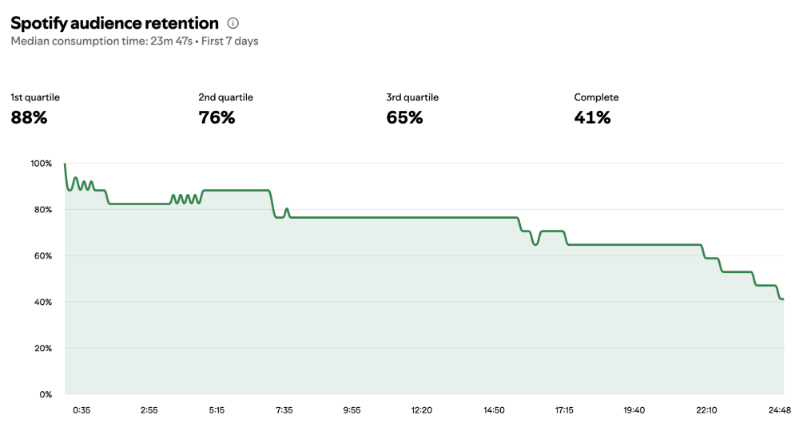
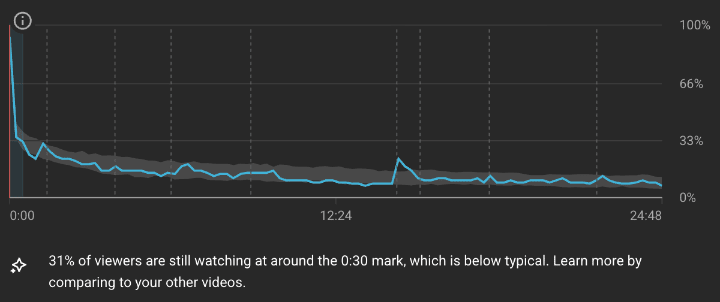
We use listener consumption analytics to guide what gets repurposed. Inside dashboards like Spotify for Podcasters, Apple Podcasts, YouTube Studio, and your hosting platform, you can see retention and replay behavior across the timeline of each episode. When the graph shows a spike, that usually signals a moment people replayed or rewatched, which is a strong indicator that the segment landed.
We map those spikes back to the episode timeline and show notes, then pull clips from the exact timestamps that earned extra attention. If a 25-minute episode shows a spike around the 5 to 6 minute mark, we clip that segment into a short video or audiogram. If another spike appears around the 15 to 17 minute window, we pull that segment too.
The result is a repurposing plan anchored to audience behavior, so your short-form assets are built around moments your listeners already proved they want to revisit.
Pro tip: You can map replay behavior across your entire back catalog in five easy steps.
Pull retention and replay data for each episode.
Identify the most replayed or rewatched moments across the catalogue.
Match those timestamps to your transcripts or show notes so you can label what was being discussed in each high-interest segment.
Look for patterns around recurring themes, questions, frameworks, or stories that consistently earn repeat attention.
Use that insight as a feedback loop for your podcast strategy because it highlights the topics your audience engages with most deeply.
Over time, this process can guide future episode themes, guest selection, and even the way you structure conversations so your next recordings naturally produce more of the moments listeners come back for.
What podcast repurposing with Content Allies looks like in practice
Spotify retention shows a clear replay zone in the early to mid portion of the episode. When retention holds steady and then lifts in a window, it usually signals listeners scrubbing back to re-hear an explanation or a framework.
Apple Podcasts consumption is strongest at the start of the episode, then tapers off across the timeline. This pattern usually means the opening framing is doing its job, and the early segments contain the clearest, most replayable setup ideas.

YouTube retention includes a noticeable mid-episode rewatch signal. That kind of bump typically happens when viewers rewind a section, jump to a specific moment, or rewatch a segment that delivers a clean, standalone takeaway.
Repurpose-ready segments for this episode
Segment 1: 00:00 to 01:25
Show note anchor: Introduction
Why this is a strong clip: Apple Podcasts activity is highest at the beginning, so the opening framing is a prime candidate for a short, high-clarity cut.
Clip angle: “Why orchestration is culture, visibility, and reliability.”
Best formats:
Vertical video clip for Shorts, Reels, TikTok, LinkedIn
Audiogram for LinkedIn and Instagram
Hook options you can place as on-screen text:
“Orchestration is not only a tool choice.”
“Scale changes what reliability means.”
Segment 2: 04:00 to 07:35
Show note anchor: Centralized data teams + scalable architectures.
Why this is a strong clip: This aligns with the Spotify replay window, and it sits early enough in the episode to capture listeners before drop-off.
Clip angle: “How centralized data teams reduce complexity as strategy evolves.”
Best formats:
Vertical video with subtitles
Audiogram with animated waveform
Hook options you can place as on-screen text:
“Scaling data starts with structure.”
“Centralization can reduce cognitive load.”
Segment 3: 09:10 to 10:30
Show note anchor: Operational and maintenance challenges.
Why this is a strong clip: Spotify retention stays engaged through this section because it names the real work that shows up after adoption.
Clip angle: “The operational reality teams face after adopting orchestration.”
Best formats:
Short video with captions and a bold opener
LinkedIn post built from one strong transcript quote
Hook options you can place as on-screen text:
“Orchestration introduces new maintenance.”
“Adoption is the beginning, not the finish.”
Segment 4: 14:43 to 16:30
Show note anchor: Abstraction layers + onboarding.
Why this is a strong clip: This matches the YouTube rewatch signal and tends to perform because it explains value in a clear, transferable way.
Clip angle: “How abstraction layers help teams onboard faster.”
Best formats:
Vertical video with a simple visual overlay of layers
Blog excerpt for your episode recap
Hook options you can place as on-screen text:
“Abstraction lowers the barrier to entry.”
“Onboarding speed is a platform advantage.”
Segment 5: 15:36 to 17:15
Show note anchor: Modularity and visibility improve reliability.
Why this is a strong clip: It stacks naturally after the abstraction layer idea and works as a standalone lesson with a clear payoff.
Clip angle: “Visibility improves reliability because it speeds diagnosis.”
Best formats:
Vertical video with highlighted keywords on screen
Newsletter snippet with a takeaway box
Hook options you can place as on-screen text:
“Visibility is a reliability lever.”
“Modularity makes change safer.”
Segment 6: 18:14 to 19:40
Show note anchor: Integrated monitoring and incident response.
Why this is a strong clip: Monitoring is a high-signal topic for this audience, and this segment translates into an actionable takeaway.
Clip angle: “How integrated monitoring shortens incident response.”
Best formats:
Vertical video
Audiogram with a headline-style caption
Hook options you can place as on-screen text:
“Incidents move faster with observability.”
“Monitoring creates response speed.”
Segment 7: 22:19 to 24:00
Show note anchor: Orchestration metadata and proactive analysis.
Why this is a strong clip: Late-episode segments often deliver distilled insight, and this one frames a strategic constraint that prompts discussion.
Clip angle: “Metadata access shapes how proactive a data team can be.”
Best formats:
Vertical video
Quote graphic for LinkedIn and X
Hook options you can place as on-screen text:
“Metadata unlocks proactive work.”
“Access determines analysis depth.”
How to package these clips so they travel
Make each clip one idea, with a single promise in the first line of the caption.
Pull one transcript sentence that reads like a headline and use it as the first on-screen text frame.
Publish as a series with one consistent theme, such as “Scaling orchestration in real teams,” so each clip reinforces the next.
Pro tip to level this up: Create a “Top Replayed Moments” library for the whole show: episode number, timestamp, topic label, and one-line hook. Over time, you’ll see which topics consistently earn replays, and that becomes your roadmap for future episodes, guest angles, and short-form content themes.
We’ve put this process into a ChatGPT Prompt for Podcast Repurposing you can paste into ChatGPT to make this repeatable.
Repurpose Podcast Content by Channel (LinkedIn, YouTube, Shorts, SEO)
Each platform has a native format, a native audience behavior, and different optimization rules. Distributing the same asset across every platform without adapting it is the primary reason repurposed content underperforms.
Repurpose podcast content for LinkedIn (posts, carousels, native video)
From our experience, LinkedIn favors content that slows the scroll.
The highest-performing formats for podcast-derived content on LinkedIn are:
Carousels (uploaded as PDFs)
Short-form text posts built around a single insight
Native video clips under 90 seconds
The carousel format specifically outperforms because, as we said above, 66% of LinkedIn’s audience is on mobile. A swipeable PDF delivers the episode’s value without requiring the reader to leave the platform.
Pro tip: Post the full episode link in the first comment, not the post body. LinkedIn’s algorithm suppresses posts with external links in the caption.
Repurpose podcast content for YouTube (full episode + YouTube Shorts + chapters)
YouTube is now the top podcast platform, reaching 31% of weekly listeners, more than any audio-only directory.
So, you can:
Upload the full video episode with chapters mapped directly from your timestamped transcript. Chapters improve the watch-time signal that YouTube’s algorithm uses to distribute your content.
Upload your best 3 to 5 clips separately as YouTube Shorts. Shorts drive subscribers back to the full episode.
Pro tip: Replace YouTube’s auto-generated captions with your Descript-exported transcript. Auto-captions are rarely accurate enough for technical B2B content and reflect poorly on authority-positioning shows.
Repurpose podcast content for Instagram Reels and TikTok (hooks + captions)
Both platforms reward hooks in the first two seconds. We advise you to:
Edit clips so the strongest, most arresting line comes first, before any context-setting.
Pro tip: Keep Reels and TikToks between 15 and 45 seconds for optimal completion rates.
For most B2B shows targeting enterprise buyers, LinkedIn and YouTube will outperform TikTok. Instagram Reels can drive meaningful top-of-funnel reach with the right clip selection and caption framing.
Repurpose podcast content for SEO (transcripts, show notes, topic clusters)
Transcripts are the foundation of podcast SEO. Every word of every episode becomes crawlable content when you publish a structured transcript page on your website. Beyond the transcript, write one dedicated blog post per episode targeting a specific search query.
Internal linking between episode blog posts builds topical authority over time, which search engines reward with broader keyword coverage across the cluster.
Repurpose podcast content for GEO
Generative Engine Optimization (GEO) is the practice of structuring content so AI search engines like ChatGPT, Perplexity, and Google AI Overviews cite it in generated answers.
Podcast-derived content, specifically transcripts and blog posts built around expert voices, specific data, and structured answers, is exactly what these systems prioritize.
Publishing episode content as clean, well-structured prose with sourced claims gives it the best chance of appearing in AI-generated responses.
Video podcast repurposing strategy (video-first vs audio-first vs hybrid)
Video production costs roughly 77% more than audio-only production and requires approximately 50% more staff at full scale.
For teams without a dedicated video budget, the pragmatic 2026 approach is the hybrid model: record video as a default, even with a single camera and basic lighting, without committing to multi-camera production until clip performance justifies the investment.
Recording video always, regardless of the show’s primary format, preserves every downstream repurposing option, including clips, YouTube uploads, and LinkedIn native video, at minimal marginal cost.
Best Tools to Repurpose Podcast Content (AI + Editing Tools)
Remember: AI tools should not replace editorial judgment. Before publishing any AI-generated asset, a human editor should verify that the content reflects the host’s actual voice, the claims match what was said in the episode, and no AI-generated clip strips context that changes the meaning of a quote.
The efficiency gain from AI tools is real. The risk of publishing AI-generated content that misrepresents the original conversation is equally real.
So, use AI to produce at scale and humans to approve before distribution.
3 Repurposing Playbooks (Choose Based on Team Size + Goals)
Choose the playbook that matches your team size, budget, and weekly production capacity.
Lean SMB playbook (1 episode → 15 assets)
Team: 1 to 2 people. Monthly tool budget: Under $50.
Tool stack: Podsqueeze ($5.99/month) for transcripts, show notes, and blog drafts. Canva (free tier) for quote graphics and carousel design. Buffer or Hootsuite for scheduling.
Asset output per episode: - 1 clean transcript - 1 SEO blog post - 1 email newsletter - 5 to 8 short-form clips (OpusClip free tier) - 3 quote graphics - 1 audiogram (Headliner free tier) - 1 LinkedIn carousel
Publishing cadence: Episode live on Monday. Clip drop Tuesday. Blog post Wednesday. Quote graphic Thursday. Email newsletter on Friday. Carousel the following Monday alongside the next episode.
This playbook keeps production overhead under two hours per episode and builds a consistent cross-channel presence without adding headcount.
Mid-market playbook (1 episode → 30–50 assets)
Team: 3 to 5 people, including a dedicated content coordinator. Monthly tool budget: $100 to $200.
Tool stack: Castmagic ($39/month) for automated content generation. OpusClip (free or Pro) for clips. Descript for editing. Canva Pro for design.
Asset output per episode: - 1 full transcript - 2 to 3 blog posts (targeting different keyword variants from the same episode) - 5 email sequences, one per buyer journey stage - 8 to 12 short-form clips across YouTube Shorts, Instagram Reels, TikTok, and LinkedIn - 5 LinkedIn text posts - 3 LinkedIn carousels - 5 quote graphics - 2 audiograms - 5 to 10 sales enablement assets (one-pagers, talk tracks, slide content)
This matches Fame’s benchmark of 15 LinkedIn posts, 3 blog articles, 5 email sequences, and 10 sales enablement assets per episode. That output profile is associated with the 3x ROI advantage over publish-and-move-on teams.
Enterprise playbook (1 episode → 60–100+ assets + enablement)
Team: Dedicated podcast team plus content, sales enablement, and social resources. Monthly tool budget: $200+ in tools, or a fully managed service.
Tool stack: Castmagic Pro ($99/month). Riverside.fm for high-quality multi-track recording. Repurpose.io for automated multi-platform distribution. Full design team for branded visual assets at scale.
Asset output per episode: - Full transcript plus a clean, edited version for publication - 3 to 5 blog posts, including at least one targeting AI search (GEO) - 10 email sequences across multiple buyer personas - 15 to 25 short-form clips distributed across all video platforms - Full YouTube episode with chapters and uploaded transcript captions - 10+ LinkedIn posts across carousels, text posts, and native video - 10 quote graphics and audiograms - Complete sales enablement kit: one-pager, talk tracks, objection responses, and slide deck content - Ebook or whitepaper chapter, compiled across 4 to 6 thematically connected episodes - Internal newsletter content for employee advocacy distribution
At this tier, repurposing operates as a full content marketing program in its own right.
Pro tip: Content Allies manages enterprise-level podcast programs at this scale.
For the Meta Business, Innovation and Technology Podcast, the program generated 170,000 downloads in the first six months, exceeding early download targets by 7x.
Conclusion
Podcast repurposing has become the operational difference between a show that builds pipeline and one that produces download counts. Every episode your team records contains enough raw material to generate 15 to 100+ assets.
The teams that systematically extract that value run faster, convert more, and close faster than teams that do not.
Content Allies designs and manages B2B podcast programs built for repurposing from the first episode, including the full content atomization workflow.
Frequently Asked Questions
How many clips should you post per episode?
For most B2B shows, three to eight clips per episode is the right range. Post the top-performing clip within 48 hours of the episode going live to capture initial audience momentum. Spread the remaining clips across the following week. Use platform analytics to identify which clip lengths and formats drive the most profile views and follows, then adjust your mix.
Should you record a video for every episode?
Yes. Even for audio-first shows, recording video in every session preserves all downstream repurposing options. You do not need a multi-camera setup to start. A single camera with basic lighting produces footage you can clip for YouTube, LinkedIn, and Instagram. Full video production adds roughly 77% to production costs at scale, but the incremental cost of adding one camera to an existing audio setup is low relative to the distribution upside it unlocks.
How long should podcast clips be for LinkedIn vs. YouTube Shorts?
For LinkedIn, keep native video clips under 90 seconds. For YouTube Shorts, 15 to 35 seconds generates the highest completion rates. For Instagram Reels and TikTok, 30 to 90 seconds is the optimal range. The first two seconds of any clip determine whether a viewer stays, so lead with the strongest or most provocative line. Never open with a context-setting intro.
Do transcripts help SEO?
Directly and significantly. Search engines cannot index audio files. Publishing a full transcript as a structured page on your website makes every word of every episode crawlable. As such, Google can rank you higher so you get more organic traffic. Transcripts also accelerate AI search visibility: structured, expert-voice content from podcast transcripts is exactly what generative AI systems like Perplexity and Google AI Overviews cite in their generated answers.
What are the best tools to repurpose podcast content?
The answer depends on team size and budget. Solo creators should start with Podsqueeze ($5.99/month) for text assets and OpusClip’s free tier for clips. Growth-focused teams get the most leverage from Castmagic ($39/month), which generates 100+ content assets from a single recording. Enterprise teams combine Castmagic Pro with Riverside.fm and Repurpose.io for automated multi-platform distribution at volume.
If your team is producing a B2B podcast and needs the full repurposing system managed end-to-end, Content Allies includes the content atomization workflow as part of its production service.
How do you repurpose podcast content without sounding repetitive?
Each asset should deliver standalone value in its own format. The raw material is the same, but the framing and format are different. If repurposed content feels repetitive, the problem is usually that teams are copying the episode verbatim rather than repackaging its insights for a specific platform and audience intent.
If your team needs a system that handles this at scale without adding internal headcount, Content Allies builds and manages the full repurposing workflow for B2B podcast programs.
Appendix: Research Sources
-
2025 B2B Podcasting Trends: Data, Insights, And What Actually Works — Fame
https://www.fame.so/post/b2b-podcasting-trends -
Podcast Repurposing: How to Expand Each Episode’s Reach — Foundation Inc.
https://foundationinc.co/lab/podcast-repurposing -
Boost Podcast Traffic on LinkedIn with Effective Repurposing Strategies – LinkedIn
https://www.linkedin.com/business/marketing/blog/linkedin-content-marketing/podcast-repurposing-strategies -
The Podcast Consumer 2025 – Edison Research
https://www.edisonresearch.com/the-podcast-consumer-2025/ -
Podcasts are Winning Attention and Driving Sales for Advertisers – eMarketer
https://www.emarketer.com/content/podcasts-driving-sales-advertisers -
B2B Podcast Marketing, Distribution, And Promotion: The 2025 Playbook For Scaling Trust And Visibility – Fame
https://www.fame.so/post/b2b-podcast-marketing-playbook -
How to Repurpose Podcast Content: 7 Practical Ways — Distribution AI
https://distribution.ai/blog/repurpose-podcast-content -
Silent Scrollers: Why 85% of Users Watch Without Sound—And What That Means for Your Content – AMZG Media
https://www.amzgmedia.com/silent-scrollers-video-without-sound -
YouTube is the Preferred Podcast Listening Service – Edison Research
https://www.edisonresearch.com/youtube-preferred-podcast-listening-service/ -
Short-Form Video Dominance: Mastering Reels, TikTok, and YouTube Shorts in 2026 – ALM Corp
https://almcorp.com/short-form-video-dominance-2026 -
Is GEO The New SEO? Optimizing For AI Search – Mod Op
https://www.modop.com/blog/is-geo-the-new-seo -
Study: Is Video Worth Doing for Your Podcast? – Podnews
https://podnews.net/article/video-podcasts-worth-it -
14 Best Content Repurposing Tools To Help You Reach More People – Designrr
https://designrr.io/content-repurposing-tools/ -
Castmagic Review 2026: AI-Driven Automation for Podcast and Content Workflows – Today Testing
https://todaytesting.com/castmagic-review -
Best Video Repurposing Tools for 2025: Stay Ahead of the Curve – Opus Pro
https://www.opus.pro/blog/video-repurposing-tools