
Riverside vs. Zencastr: Best Remote Recording Tool for B2B Podcasts
For B2B podcasters, the remote recording tool you choose directly affects audio quality, guest experience, and production efficiency.
According to The Podcast Host's 2024 Gear Survey, remote interviews are now the second most popular podcast format overall (26.3%) and the most popular among podcasters with one to five years of experience (34.47%).
Riverside and Zencastr are both remote recording tools for B2B podcasts. Each platform uses local recording to capture high-quality audio and video.
However, they differ in pricing, editing tools, guest experience, team workflows, and how easily each one supports a repeatable B2B podcast production process.
This guide compares Riverside vs. Zencastr so you can choose the best remote recording tool for your B2B podcast team.
Riverside vs Zencastr: Head-to-Head Comparison
| Podcast | Host(s) | Best For | Main Focus |
|---|---|---|---|
| Marketing Against the Grain | Kipp Bodnar and Kieran Flanagan | Future-facing marketing ideas | B2B marketing, AI, demand generation, SEO, content, growth strategy |
| Lenny’s Podcast | Lenny Rachitsky | Product-led growth thinking | Product strategy, growth, startups, AI, leadership, GTM thinking |
| Marketing School | Neil Patel and Eric Siu | Short daily marketing lessons | SEO, digital marketing, AI, content, paid media, social media |
| SaaStr Podcast | Jason Lemkin and SaaStr guest hosts | SaaS scaling lessons | B2B SaaS, startup growth, sales, fundraising, GTM leadership |
| Marketing Trends | Stephanie Postles | Executive marketing strategy | Marketing leadership, brand strategy, customer experience, demand generation |
| The Marketing Millennial | Daniel Murray | Modern social-native marketing | Social media, content, brand building, newsletters, creator-led strategy |
| The CMO Podcast | Jim Stengel | Brand leadership conversations | CMO leadership, brand strategy, creativity, customer experience |
| GTM Live | Carolyn Dilks and Trevor Gibson | Revenue-focused GTM strategy | GTM strategy, pipeline, attribution, AI, unit economics, sales-marketing alignment |
| Exit Five / The Dave Gerhardt Show | Dave Gerhardt | Practical B2B marketing playbooks | Demand generation, brand, positioning, content, product marketing, leadership |
| Demand Gen Visionaries | Ian Faison | Pipeline and demand generation | Demand generation, pipeline, sales alignment, revenue marketing |
Riverside
Founded in 2020 at the start of the COVID-19 pandemic, Riverside was built to solve one of the biggest challenges in remote interviews: poor audio and video quality caused by unstable internet connections.
Instead of relying on compressed video calls, it uses local recording to capture separate audio and video tracks on each participant's device before automatically uploading them to the cloud.
Since launch, Riverside has expanded from a remote recording tool into a full podcast production platform. Today, it combines recording, AI editing, podcast hosting, live streaming, webinar hosting, and content repurposing in a single workflow.
A few notable facts about Riverside:
Enterprise adoption: Google, Microsoft, and Marvel reportedly reduced editing time by up to 80%, while creators recorded more than 100 million minutes on the platform in 2024.
Spotify partnership: Became an official Spotify partner in 2024, enabling creators to record and edit podcasts directly within Spotify for Creators.
Market adoption: According to The Podcast Host's 2024 Gear Survey we shared above, Riverside is the fifth most popular recording software overall (7.9%) and the most widely used platform built specifically for remote podcast recording.
Zencastr
Founded in 2014 by Josh Nielsen, Zencastr was one of the first platforms built specifically for browser-based remote podcast recording. Its core innovation was local recording, which captured each participant's audio on their own device to avoid the quality loss caused by unstable internet connections.
Over the years, Zencastr has expanded from a recording tool into a broader podcasting platform with AI editing, podcast hosting, monetization, analytics, and content repurposing features.
A few notable facts about Zencastr:
Remote recording pioneer: One of the earliest major platforms to use local recording for high-quality remote interviews.
Platform expansion: In 2022, Zencastr evolved from a recording-only tool into a full podcast production platform with editing, podcast hosting, AI clipping, monetization, and analytics.
Lean operation: Compared with Riverside, Zencastr operates with a smaller funding base and team, which may influence the pace of feature development and enterprise support.
Best known for: A generous free plan that includes local recording, support for up to 10 participants, unlimited separate track downloads, and built-in podcast hosting.
Which is the Best Remote Recording Tool for B2B Podcasts: Riverside vs Zencastr
Riverside and Zencastr take different approaches to recording quality, collaboration, post-production, and workflow.
The best choice depends on how your team records, edits, and publishes episodes, so let's compare how they perform at every stage of a live remote recording session.
1. Audio & Video Quality
The biggest difference between Riverside and Zencastr is how much recording quality each platform gives you at each tier.
Riverside is stronger if your team is building a polished video-first podcast workflow. Paid plans support up to 4K video, 48kHz WAV audio, separate audio and video tracks, and stronger post-recording tools for cleaning, editing, and repurposing the session. However, Riverside’s Free plan is more limited, with 720p video, 44.1kHz audio, a watermark, and a one-time cap on separate track recording.
Zencastr gives more away up front. Its Free plan includes 1080p video, 16-bit 48kHz WAV audio, up to 10 participants, and unlimited separate track downloads. This makes it more useful for when you want to test remote podcast recording without committing to a paid plan immediately.
Riverside is better suited if you already know you need premium video quality and a deeper production workflow, while Zencastr is more generous if you’re testing remote recording or producing simpler interview-format shows on a tighter budget.
If your show depends on executive video clips, social repurposing, or high-quality source files for post-production, Riverside has a stronger long-term production ceiling. And if your immediate priority is clean remote audio and video at the lowest possible cost, Zencastr is easier to justify early on.
2. Guest Capacity for Remote Sessions
If your B2B podcast includes customer roundtables, expert panels, or multi-speaker discussions, guest capacity is worth comparing.
Zencastr supports up to 12 participants per recording, including one host and 11 guests. And Riverside supports up to 10 on-screen participants, including one host and nine recorded guests.
Both platforms comfortably handle the guest count required for most B2B podcasts.
The numbers only matter if your show regularly records larger groups. For one-on-one interviews or conversations with two or three guests, you'll notice little difference between the platforms. If your team frequently hosts larger discussions, Zencastr gives you room for two additional participants in the same recording.
Guest capacity is only one part of the decision. Your recording quality, editing workflow, collaboration features, and publishing process will usually have a much bigger impact on your day-to-day production than the difference between 10 and 12 participants.
3. Connection Resilience and Session Recovery
Connection resilience is where Riverside has a clearer advantage. Both platforms use local recording, so the final recording is not fully dependent on the live internet connection. But Riverside puts more emphasis on automatic backup and recovery during the session itself.
Riverside is stronger for session protection because it:
Records each participant’s audio and video locally on their own device
Uploads files to the cloud in the background during the session
Helps protect the recording if a guest’s connection lags, freezes, or drops
Makes files available in the dashboard after the session ends
This matters because failed remote recordings are expensive. If a customer, executive, or industry expert loses connection halfway through an interview, the priority is making sure the usable recording survives.
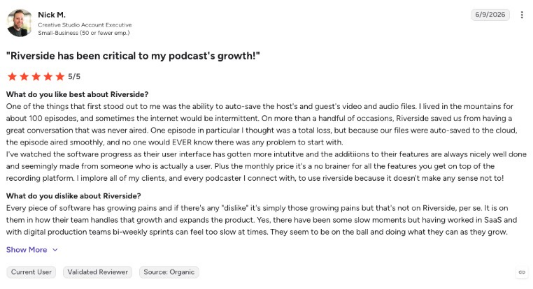
User reviews support this strength. One Riverside reviewer on G2 said the platform’s auto-save feature protected episodes even when they were recording from the mountains with intermittent internet. The reviewer said Riverside saved them from losing a strong conversation that otherwise may never have aired.
Zencastr also has recovery features. It saves backup copies in local browser storage, and internet-quality backups can be recovered within 30 days of the recording date. However, the live recording experience can involve a little more manual intervention.
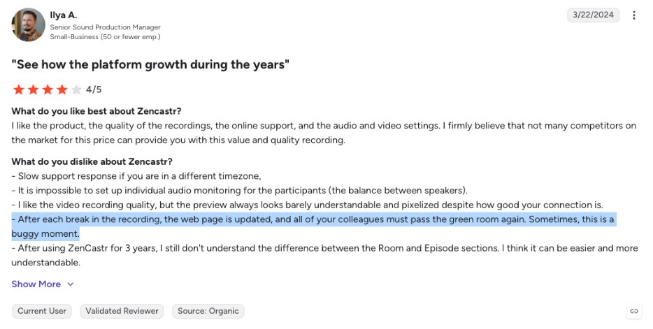
One verified G2 reviewer reported that after pausing a recording, the session refreshed and every participant had to go through the green room again. The reviewer noted that this process could be buggy at times, adding friction during multi-guest recordings.
Here’s a quick overview of the difference.
For most one-on-one interviews, both platforms provide reliable recording quality. Your choice depends on the type of recording you run most often:
Choose Riverside if your B2B podcast features executives, customers, or larger panel discussions where rescheduling would be difficult. Its recording workflow provides greater confidence during high-stakes sessions.
Choose Zencastr if your recordings are smaller and your team is comfortable handling occasional interruptions during live sessions. Its recovery features still provide solid protection for recorded files.
4. Separate Track Recording
Separate track recording is one of the biggest practical differences between Riverside and Zencastr once you move beyond occasional recording.
Both platforms record separate audio and video tracks for each remote participant. This matters because editors can clean up one guest’s background noise, fix volume issues, adjust audio sync, or replace a damaged track without affecting the rest of the conversation.
The main difference is access.
Zencastr is more generous here:
Unlimited separate track recordings on all plans
Unlimited separate track access on Free
Separate local tracks for each participant
Stronger fit for teams recording frequently or managing several shows
Riverside is more structured by tier:
Free: 2 hours of separate track downloads as a one-time allowance
Pro: 15 hours per month
Grow: 20 hours per month
Webinar: 25 hours per month
Business: unlimited separate track downloads
If you’re producing one or two episodes per month, Riverside’s limits may be enough. But for agencies, media teams, or B2B brands running multiple podcast series, those caps can become a workflow issue quickly. Once you hit the monthly limit, you may still have the recording, but you cannot download additional separate tracks until the next billing cycle or an upgrade.
This gives Zencastr a clear advantage for high-volume production. If your team depends on multitrack recording every week, Zencastr’s unlimited model means there’s less risk of hitting a usage wall.
5. AI Editing and Post-Production
AI editing is where Riverside starts to pull ahead for teams that want a more complete post-production workflow after the live recording ends.
Both platforms offer AI-powered tools that help reduce manual editing work. Instead of manually cutting audio and video from a timeline, teams can work from the transcript, remove filler words, generate clips, and accelerate automated post-production.
Riverside has the deeper AI editing stack:
AI transcriptions in 100+ languages
Text-based audio and video editing
Magic Audio for noise reduction and audio leveling
Eye contact correction
Automatic show notes
AI clip generation
Tools to remove or replace words in the transcript and reflect those edits in the final audio or video
This makes Riverside useful for B2B teams that need to turn one remote interview into a full content package with a polished episode, transcript, show notes, social clips, and short-form video assets.
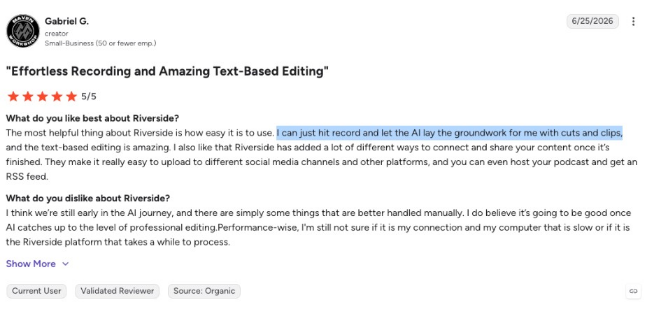
One Riverside reviewer on G2 summed up the benefit well, noting that they could “just hit record” and let the AI handle the groundwork for cuts and clips. This is the real value for teams without a dedicated audio engineer: less time spent fixing the recording and more time turning the conversation into usable content.
Zencastr’s AI tools are more focused on cleanup and clipping:
Automatic removal of 20+ filler words
ZenAI clipping with captions and titles
Direct publishing of clips to social platforms
Unlimited ZenAI clips and the full ZenAI editing suite on Business
Zencastr is still useful for teams that want faster editing and clip creation, but its AI workflow feels more focused on practical cleanup than full production automation.
6. Podcast Hosting and Distribution
Riverside includes podcast hosting and publishing on Pro and above. Teams can record, edit, host, and publish from one platform to YouTube, Spotify, Apple Podcasts, Instagram, LinkedIn, and other channels. Its Grow plan also adds hosting for two shows, social scheduling, a creator website, newsletters, video hosting, and live streaming tools.
Zencastr is more generous early. Its Free plan includes unlimited audio hosting, unlimited audio uploads, an embeddable player, and unlimited audio and video recording. Paid plans add YouTube video publishing, dynamic content insertion, multi-show support, and team seats.
The practical difference is simple:
Choose Riverside if your podcast supports a wider video-first workflow across podcast platforms, YouTube, LinkedIn, newsletters, live streaming, and webinars.
Choose Zencastr if you want hosting included early, lower-cost multi-show management, or dynamic content insertion for campaign messages and sponsor reads.
For pure remote recording, hosting may not decide the final choice. But if your team wants one platform to handle more of the podcast workflow, this difference matters quickly.
7. Guest Experience
Both Riverside and Zencastr are web-based platforms, so remote guests can join through a browser link without downloading podcasting software. This matters for B2B shows because guests may be executives, customers, partners, or outside experts who do not want to troubleshoot a new tool right before recording.
The difference is how simple each platform feels once the guest enters the session.
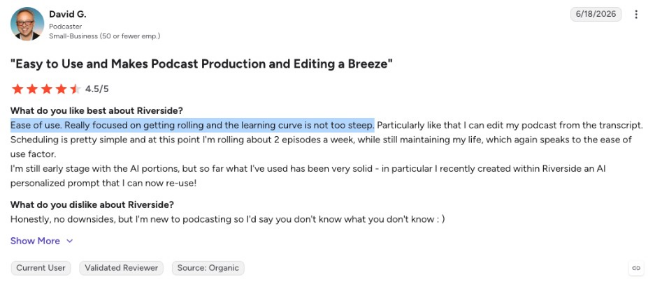
Riverside has a stronger reputation for ease of use. Its interface is built around getting hosts and guests into the recording room quickly, with a simple studio experience and a low learning curve. One G2 reviewer described Riverside as easy to use and focused on “getting rolling,” with a learning curve that is “not too steep.”
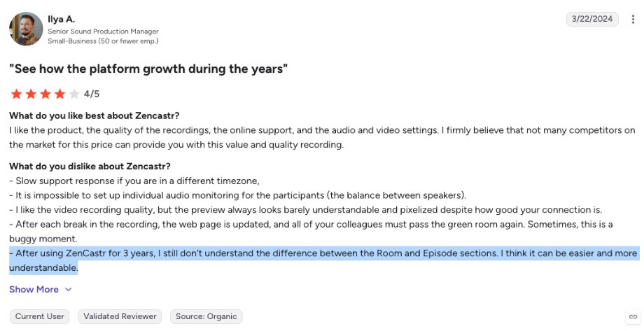
Zencastr also removes the download barrier, but some users find the workflow less intuitive. One long-time Zencastr reviewer said they still did not fully understand the difference between the “Room” and “Episode” sections after three years of use. That kind of confusion may not affect internal users, but it can slow down first-time guests.
The practical difference is simple:
Choose Riverside if guest confidence and low-friction onboarding are top priorities.
Choose Zencastr if your team is comfortable guiding guests through the room setup process.
Either platform can work for repeat guests, internal recordings, or simple one-on-one interviews.
Overall, both platforms make remote guest access simple. Riverside has the stronger case when the guest experience needs to feel smooth from the first click.
8. Live Streaming and Content Repurposing
Live streaming is one of the clearest differences between Riverside and Zencastr. Riverside supports live streaming, while Zencastr does not offer native live streaming.
Riverside’s Grow plan includes full HD 1080p live streaming, multistreaming to unlimited destinations, and custom RTMP. Teams can record a podcast episode, broadcast it live to YouTube, LinkedIn, Facebook, X, Twitch, or another destination, then repurpose the same recording afterward. Riverside also supports social scheduling, AI thumbnails, newsletters, a creator website, video hosting, Magic Clips, live call-ins, stream chat, overlays, and lower thirds.
Zencastr is more focused on post-recording repurposing. It offers ZenAI clipping with captions and titles, direct full-video publishing to YouTube, instant clip publishing to four social platforms on Grow, and clip scheduling to seven social platforms on Scale. This is useful for social distribution after recording, but it does not replace a native live streaming workflow.
Video repurposing also matters because video podcasts can improve retention. Spotify’s Podcast Fan Study found that video podcast listeners were 1.3x more likely to return than audio-only podcast listeners.
The practical difference is simple:
Choose Riverside if your podcast also supports live executive interviews, customer roundtables, product launches, webinars, virtual panels, or LinkedIn Live sessions.
Choose Zencastr if your main need is turning recorded episodes into clips, captions, YouTube videos, and scheduled social posts.
9. Reliability and Customer Support
Reliability is a serious buying factor for B2B teams. A failed recording can mean losing time with a customer, executive, partner, or hard-to-book subject matter expert.
Both Riverside and Zencastr have positive user feedback, but both also have documented support complaints. Riverside has the stronger enterprise setup. Its Business plan includes a dedicated customer success manager, customized onboarding, SSO, SOC2/ISO27001 compliance, Salesforce integration, and API access.
That said, Riverside is not free from support issues. Some G2 reviewers mention slow technical support, audio sync problems, billing concerns, and refund delays. Zencastr has a lighter support model, and some reviewers mention slower response times, billing issues, and cancellation friction.
The practical difference is simple:
Choose Riverside if you need enterprise controls, onboarding, compliance features, and customer success support.
Choose Zencastr if your workflow is simpler and your team can work with a lighter support model.
Neither platform clearly promotes a hard support SLA on standard plans, so confirm support expectations before choosing a long-term plan. Overall, Riverside has the stronger enterprise support setup, but both tools deserve a full workflow test before you commit.
10. Analytics and Tracking
For B2B podcasters, analytics help teams understand which guests, topics, formats, and distribution channels are actually working.
This is where Riverside has the stronger case. Podcast hosting analytics are included from Pro, covering standard metrics like plays, downloads, and listener geography. The Webinar plan adds lead capture and HubSpot integration, while Business adds Salesforce integration and API access. This makes Riverside more useful if you’re connecting podcast content to webinars, CRM workflows, and campaign reporting.
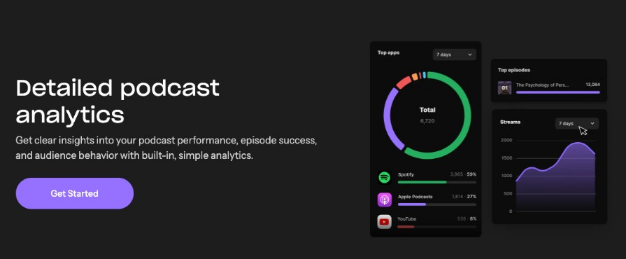
Zencastr includes analytics across its plans, but its public pricing information is less specific about reporting depth. Its strongest analytics-adjacent feature is dynamic content insertion on Scale, which can help teams track campaign-specific mid-rolls, event promotions, or sponsor reads inside episodes.
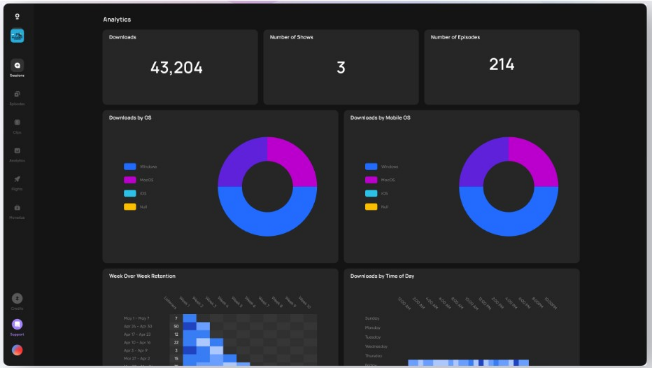
Neither platform is a full B2B attribution tool. If your team needs account-level listener data, buyer intent, company identification, or podcast-to-pipeline reporting, you will likely need a dedicated analytics platform alongside Riverside or Zencastr.
Choose Riverside if you need CRM integrations, webinar analytics, lead capture, or deeper visibility into marketing workflows.
Choose Zencastr if you need simpler podcast analytics, dynamic content insertion, and lower-cost reporting.
Use a third-party analytics tool if account-level attribution is the real goal.
What Real Users Say: G2 and Community Sentiment
User reviews are useful here because they show how each platform performs outside the sales page. The patterns can teach us a lot about how the tools feel during day-to-day production.
Riverside has a much stronger review profile by volume and rating. It holds a 4.8-star rating across 1,735 G2 reviews, which gives buyers a larger sample size to evaluate. The most common praise centers on the platform’s ease of use, ongoing product improvements, AI-powered tools, cloud save functionality, and social distribution features.
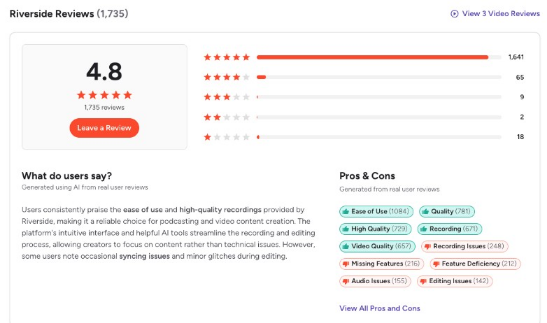
The tradeoff is that Riverside’s criticism is less about recording quality and more about business operations. Negative reviews mention billing disputes, slow technical support for audio sync issues, and contract inflexibility at higher spend levels.
Zencastr has a smaller and more mixed review base. It holds a 3.7-star rating across 30 G2 reviews, so you need to be a little more careful about drawing conclusions. Positive reviews tend to focus on strong audio quality, individual audio tracks, useful timestamps for edit notes, and good value for the price.
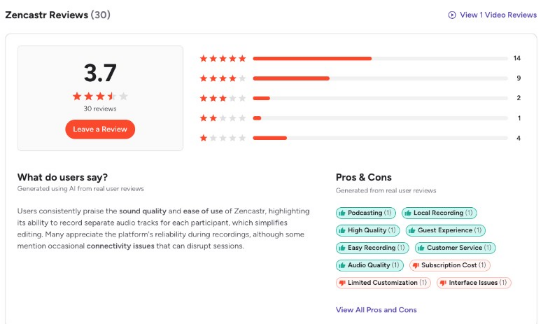
The recurring complaints are more workflow-related. Reviewers mention confusing navigation between rooms and episodes, slower support for non-U.S. time zones, pixelated video previews, limited live audio monitoring, and friction when guests need to re-enter the green room after breaks.
Riverside has the stronger overall user sentiment and larger review base.
Zencastr receives praise for core recording value, especially audio quality and separate tracks.
Riverside’s main risk areas are billing, contracts, and technical support.
Zencastr’s main risk areas are the clarity of the interface, support speed, and live session friction.
The review pattern backs up the trend we’ve been seeing all the way through. Riverside appears more polished and production-ready, while Zencastr can be cost-effective but may require more hands-on workflow management.
Riverside vs Zencastr: Breaking Down the Pricing
When it comes to pricing, you need to look at whether each plan matches your recording volume, team structure, post-production needs, and support requirements.
Prices can change over time, so always confirm current pricing and plan limits on Riverside's and Zencastr’s official websites before making a purchase decision.
Riverside Pricing
| Plan | Price | Key remote recording inclusions |
|---|---|---|
| Pro | $14/mo | 1 studio, 15 hours of separate track downloads, 4K video, 48kHz audio, AI editing, podcast hosting, text-based editing |
| Grow | $19/mo | 2 studios, 20 hours of separate track downloads, everything in Pro plus live streaming, social scheduling, and 2 podcast shows |
| Webinar | $49/mo | 3 studios, 25 hours of separate track downloads, everything in Grow plus webinar tools for up to 100 registrants and HubSpot integration |
| Business | Custom | Unlimited studios, unlimited separate track downloads, producer mode, simultaneous recording, up to 10,000 webinar registrants, Salesforce integration, API access, SSO, and SOC2 compliance |
Riverside is priced for teams that want more than basic remote recording. Pro is the entry point for 4K video, 48kHz audio, AI editing, show notes, podcast hosting, and higher-quality exports.
Grow is a better choice for teams that also need live streaming, social scheduling, and multiple shows. Webinar and Business are where Riverside becomes more relevant for B2B teams connecting podcasts to webinars, CRM workflows, lead capture, and enterprise production controls.
The main tradeoff is usage structure. Riverside caps separate track downloads at 15-25 hours per month until Business. That may be fine for a single show, but agencies or media teams producing several shows may need to watch those limits closely.
Zencastr Pricing
| Plan | Price | Key remote recording inclusions |
|---|---|---|
| Free | $0 | Unlimited audio/video recording, up to 10 participants, unlimited separate track recordings, 1080p video, 16-bit 48kHz WAV audio, 90-day masters storage |
| Grow | $30/mo | Everything in Free plus 4K video, ZenAI clipping with captions, filler word removal, and clip publishing to 4 social platforms |
| Scale | $50/mo | Everything in Grow plus scheduling to 7 social platforms, dynamic content insertion, 4 shows, and 2 team seats |
| Business | $100/mo | Everything in Scale plus unlimited ZenAI clips, full ZenAI editing suite, 6 shows, and 4 team seats |
Zencastr is more generous at the low end. Its Free plan is genuinely usable for testing a remote recording workflow, with 1080p video, up to 10 participants, unlimited separate track recordings, and unlimited audio hosting.
Zencastr also has a clearer advantage for high-volume separate track access because separate track recordings are unlimited across plans. Its Scale plan is useful if you’re managing multiple shows or using dynamic content insertion for campaign messages, event promos, or sponsor reads.
However, Zencastr does not offer the same enterprise layer as Riverside, with no comparable public tier for SSO, SOC2, Salesforce integration, producer mode, or dedicated enterprise production controls.
Best Fit by Use Case
There is no universal winner in the Riverside vs Zencastr comparison. The right choice depends on your production model, episode volume, guest profile, and how much of the podcast workflow you want one platform to handle.
| Use case | Best fit | Why |
|---|---|---|
| Video-first B2B podcasting | Riverside | Best if each recording needs to become a YouTube episode, LinkedIn clips, short-form video, newsletter content, and polished executive thought leadership assets. |
| Live sessions, webinars, or event-based podcasting | Riverside | Better fit when podcast recording overlaps with live events, webinars, virtual panels, or video-first campaigns. |
| Growing production complexity | Riverside | Stronger choice if your team may eventually need advanced production controls, onboarding, CRM-connected workflows, compliance features, or enterprise account management. |
| Long-term product momentum | Riverside | Riverside has expanded quickly across AI editing, Spotify workflows, live streaming, webinars, and content repurposing, which makes it stronger for teams choosing a long-term platform partner. |
| Low-cost production testing | Zencastr | Better if your team wants to test remote recording before committing budget. Its Free plan is more usable for real production testing. |
| Simple interview format shows | Zencastr | Strong fit for repeatable one-host, one-to-three-guest remote interviews that do not require live streaming, webinars, or enterprise workflow controls. |
| Multiple smaller shows | Zencastr | Useful for lean teams, agencies, or brands managing several podcast concepts at accessible pricing tiers. |
| Dynamic content insertion | Zencastr | Better if your team wants to rotate campaign messages, event promos, sponsor reads, or branded mid-rolls without a separate insertion tool. |
| Small teams without enterprise needs | Zencastr | More cost-efficient if your team does not need advanced compliance, CRM, onboarding, or support requirements. |
For a more visual walkthrough of the Riverside vs Zencastr comparison, this video breaks down the major features and workflow differences between the two platforms:
Build a B2B Podcast That Goes Beyond the Recording Platform
Choosing between Riverside and Zencastr solves one part of the podcast workflow. The bigger challenge is building a B2B podcast that consistently earns attention, creates trust, supports the pipeline, and turns every episode into usable content across multiple channels.
That is where Content Allies B2B podcast production services come in.
We manage end-to-end B2B podcast production, including platform selection, remote recording setup, guest coordination, episode production, editing, distribution, and promotion. Whether your team uses Riverside, Zencastr, or another podcast recording software, the goal is always to build a repeatable system that makes it easier to publish high-quality episodes consistently.
If you want help choosing the right production workflow, improving recording quality, or scaling your podcast into a broader content engine, book a discovery call with Content Allies.
FAQs
Can Riverside and Zencastr record guests who join from a mobile device during a remote session?
Yes, but the experience differs. Riverside has dedicated iOS and Android mobile apps, which make mobile recording more reliable for guests joining from a phone. Zencastr’s mobile app can record audio and video on mobile, but Android support does not appear to be available yet, so Android guests may need to join from a desktop or use another workflow.
Do Riverside and Zencastr store raw recording files, and how long are masters retained before deletion?
Both platforms store recording files in the cloud after the session, but retention varies by plan. Zencastr’s Free plan lists 90-day master storage, while Riverside’s storage and download access depend on the plan, so teams should confirm retention rules before using either platform as long-term cloud storage.
How do Riverside and Zencastr support producers managing multiple remote guests during a live recording?
Both Riverside and Zencastr can support producer-led remote recordings, but their workflows differ. Riverside offers advanced production controls on higher tiers, while Zencastr provides multitrack recording and a simpler recording setup. Teams with dedicated producers should test both workflows with their usual guest count before choosing.
Can Content Allies manage the technical setup, guest briefing, and in-session troubleshooting for remote recordings?
Yes. Content Allies can handle the remote recording workflow, including platform setup, guest instructions, pre-call checks, recording room management, and basic troubleshooting during the session. This is valuable for B2B teams recording executives, customers, analysts, or other guests who should not have to manage technical details themselves.