
Podcast Sales Enablement: How to Turn Episodes Into Assets Reps Can Use
B2B buyers do most of their deciding without a salesperson in the room. They research alone, compare notes with colleagues, and pull in stakeholders the rep never meets.
Gartner reported in March 2026 that 67% of B2B buyers prefer a rep-free experience, based on a survey conducted in 2025.
That makes useful, shareable content valuable during the sales process. B2B podcast episodes often contain firsthand insights from industry peers, but a 45-minute recording isn't easy for buyers to review or reps to share.
This guide explains how to turn those conversations into short, searchable sales assets reps can find, send, and track at each deal stage.
P.S. If your sales team needs usable assets from every episode, we can build that into the podcast process. Our B2B podcast services cover strategy, guest booking, production, and rep-ready assets.
TL;DR
Podcast sales enablement means packaging episodes into short, tagged assets that reps send at specific deal stages.
Reps ignore most podcast content because it was planned for reach and is buried in long files nobody can search.
A prospect's own episode gives reps an asset that features the guest's voice and ideas.
Plan the sales moments in the episode brief, set a 48-hour tagging target, and store approved clips where reps already work.
Track rep usage and influenced pipeline. Downloads tell you almost nothing about sales impact.
What Is Podcast Sales Enablement?
Podcast sales enablement is the practice of turning podcast episodes into short, searchable sales assets that reps can share with buyers at specific deal stages. It connects the content team producing the show with the sales reps managing buyer conversations.
Unlike podcast marketing, which focuses on reaching a broader audience, podcast sales enablement focuses on using existing content to address buyer questions, build credibility, and keep deals moving.
| Dimension | Podcast marketing | Podcast sales enablement |
|---|---|---|
| Goal | Reach and brand awareness | Deal progress and win rate |
| Audience | Anyone in the category | A named buyer or buying committee |
| Unit of content | The full episode | A 60-second clip, a quote, a timestamp |
| Owner | Content or brand team | Content team plus sales enablement |
| Success metric | Downloads, followers | Rep usage, reply rates, influenced pipeline |
This piece focuses on the sales use. Turning episodes into social posts, blogs, and newsletters for reach is a separate workflow covered in our guide to how to repurpose podcast content.
Why Sales Teams Ignore Podcast Content for Sales Conversations
Sales teams ignore podcast content because it was planned for an audience, stored in a feed, and handed over without their input. The problem sits in how episodes get packaged for sales.
1. Episodes Prioritize Reach Over Sales Needs
Topics chosen solely for audience reach can miss the objection a rep is facing in a live deal. Bring those buyer questions into the episode brief.
2. Useful Sales Moments Get Buried in Long Episodes
A rep heading into a call with a skeptical CFO needs the two minutes where a peer explains the business case. If that moment lives at minute 31 of an untagged episode, it effectively doesn't exist.
3. Reps Can't Find Relevant Clips When They Need Them
Reps work in the CRM, their inbox, and Slack. A podcast page on the company website sits outside all three, so finding the right moment means leaving the workflow and scrubbing audio.
4. Sales Reps Have Little Input Into Episode Planning
When reps have no input into topics or guest questions, the show can miss the problems buyers raise in actual sales conversations.
This disconnect matters. Gartner's April 2026 release reported that organizations collaborating with other functions on enablement content were 2.4 times more likely to achieve strong commercial growth.
The rest of this guide addresses these four problems, from planning episodes around buyer questions to making clips easy for reps to find and share.
Which Types of Podcast Content for Sales Do Reps Actually Use?
Give reps assets tied to a specific deal moment: a pre-meeting clip, a peer answering an objection, or the episode a prospect appeared on. Use the formats below as starting points; adjust length to the buyer's question.
| Asset | Length | Buyer it serves |
|---|---|---|
| Send-ahead clip | 60-120 seconds | Primary contact |
| Objection clip | 1-3 minutes | Skeptical stakeholder |
| Peer proof clip | 1-2 minutes | Economic buyer |
| Prospect’s own episode | Full episode plus 3 clips | Guest and their colleagues |
| Buying committee forward pack | 3 clips plus summary | Hidden buyers |
| Proposal pull quotes | 1-3 sentences | Procurement, finance |
| Internal enablement episodes | 10-20 minutes | Your own reps |
Send-Ahead Clip
Choose an excerpt that addresses the pain the prospect named when booking. A short note should explain why it's relevant before the buyer presses play.
Objection Clip
Choose an answer with enough context to explain the concern and how the speaker addressed it. Avoid cutting out qualifications that change the meaning.
Peer Proof Clip
Use a customer's own account of a measurable outcome. Preserve the timeframe and conditions behind the number so the excerpt doesn't overstate what happened.
The Prospect's Own Episode
A prospect's own episode can give a rep a natural reason to reconnect. Offer the guest a polished version and ask which excerpts they want to share with colleagues.
This is the payoff of an account-based approach: invite people from target accounts, have a real conversation, then hand the guest a polished asset that spreads inside their company.
For example, when Upshift partnered with Content Allies to produce its Hospitality Leaders podcast, over half of its guest interviews led to new revenue opportunities or expanded existing client relationships. Our team at Content Allies handled guest outreach, production, and distribution, while host Chris Cano spent around two hours a week on the show.
Buying Committee Forward Pack
Make the summary clear enough for stakeholders who missed the sales call. Explain which question each clip answers so the champion can forward the pack without rewriting it.
Proposal Pull Quotes From Transcripts
Keep the speaker's name, role at the time of recording, and episode reference with each quote. Preserve any qualification needed to understand the claim.
Internal Enablement Episodes
Use a private feed for deal debriefs, competitive briefings, and product updates that aren't suitable for public distribution. Restrict access and review sensitive details before release.
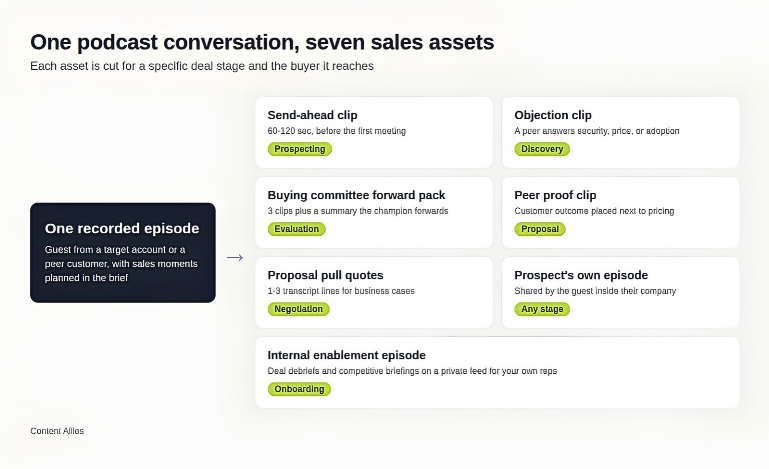
One recorded conversation feeds seven sales assets, each matched to a deal stage. Source: Content Allies original
How to Map Podcast Episodes to B2B Sales Stages
Map each episode to the question a buyer is asking at that stage, then decide which asset a rep sends and what signal tells you it worked. The asset types are defined above. This section covers timing.
Edelman and LinkedIn B2B Thought Leadership Impact Report cites research indicating that more than 40% of B2B deals stall due to internal misalignment. It also reports that 95% of hidden buyers say strong thought leadership makes them more receptive to sales and marketing outreach.
Podcast content travels well inside those groups because it's easy to forward and easy to consume between meetings. It's also why an account-based podcast strategy, with stakeholders from target accounts as guests, pays off at more than one stage.
| Sales stage | Buyer question | Episode type | Sales asset | Rep action | Signal to track |
|---|---|---|---|---|---|
| Prospecting | Does this company understand my world? | Industry problem episode | Send-ahead clip, guest invitation | Invite target accounts as guests or send a clip with outreach | Reply rate, guest acceptance |
| Discovery | Have others solved this problem? | Customer or peer story | Objection clip | Send the clip that matches the pain named on the call | Clip opens, second meeting booked |
| Evaluation | Will this work for our team and stack? | Practitioner deep dive | Buying committee forward pack | Give the champion a forwardable pack | New stakeholders joining calls |
| Proposal and decision | Is this choice defensible? | Customer outcome episode | Peer proof clip, pull quotes | Embed proof next to pricing | Time from proposal to signature |
| Stalled deal | Is this still worth our attention? | New episode on the stalled topic | Fresh clip with a short note | Re-open the thread with something new | Thread revived within 14 days (suggested review window) |
| Post-sale expansion | How do we get more value? | Advanced use case episode | Clip series for customer success | Share in QBRs and onboarding | Expansion pipeline, renewal rate |
Customer expectations shift at each stage. Early on, buyers want to feel understood. Later, they want proof that the choice will hold up in front of their CFO.
Before producing new episodes, sort the existing catalog into these six stages. Audit it for gaps at proposal and stalled-deal stages, then use the missing buyer questions to plan future episodes.
How listeners become leads in the first place is covered in our guide to using a B2B podcast for sales and lead generation.
How to Build a Podcast Sales Enablement Workflow
The workflow runs in seven steps, from collecting objections before an episode is booked to retiring stale clips every month. The first three steps establish the buyer questions and tags each episode needs.
Step 1: Interview Reps for the Objection List Before Booking Guests
Run a 30-minute session with two or three reps each quarter. Ask the following questions:
What objections came up most in lost deals
Which questions buyers asked right before going quiet
What proof would have changed a skeptical stakeholder's mind
Rank the top 10 objections by how many deals they touched. That ranked list becomes the brief for the next batch of guest bookings. A guest who has lived through the objection and solved it is worth more to sales than a bigger name with a general take.
Step 2: Write Sales Moments Into the Episode Brief
Clips that work in sales get planned before recording. Add a "sales moments" block to each episode brief with two or three questions the host must ask, each tied to an objection from Step 1.
Good sales-moment questions ask for specifics:
"Walk me through the week you realized the old process was breaking."
"What did your CFO push back on, and what answered it?"
"What surprised you in the first 90 days?"
Hosts also need to know how to steer a conversation toward these moments without making it feel scripted. We cover that in our guide to conducting a revenue-focused podcast interview.
Step 3: Tag Every Clip by Objection, Persona and Stage Within 48 Hours
Cutting clips has become cheap. AI tools can find highlights and add captions in minutes. The bottleneck has moved to tagging, because an untagged clip is invisible to the rep who needs it.
Use 48 hours after recording as a working target for tagging candidate clips, while the producer still remembers the strongest answers. Release clips only after the required guest and brand approvals.
| Field | Example values | Why reps need it |
|---|---|---|
| Objection | Security, implementation time, price, adoption | Reps search by the concern they're facing |
| Persona | CFO, IT lead, operations director | Matches the clip to the stakeholder |
| Deal stage | Discovery, evaluation, proposal | Stops early-stage clips landing in late-stage deals |
| Industry | Healthcare, SaaS, manufacturing | Peers from the same industry carry more weight |
| Guest company size | SMB, mid-market, enterprise | Buyers trust peers at a similar scale |
| Approved for external use | Yes, internal only | Protects guest agreements |
| Expiry date | Date of next review | Keeps outdated claims out of deals |
Step 4: Store the Clip Library Where Reps Already Work
Put the library inside the tools reps open every day. Every extra click between a rep and a clip lowers the chance it gets sent.
| Location | Strengths | Weaknesses | Best for |
|---|---|---|---|
| CRM (HubSpot, Salesforce) | Clips sit on the deal record; usage is trackable | Needs admin setup | Teams that live in the CRM |
| Revenue enablement platform | Search, analytics, content governance | Extra license cost | Larger sales teams with an enablement function |
| Slack or Teams channel | Fast, familiar, easy to post new clips | Hard to search after a few months | Small teams starting out |
| Shared drive with a tagged index sheet | Free, simple | No usage data, files go stale | Founder-led sales |
Pick the location that fits your current tech stack, then add a pinned index so the newest and most-used clips are always one click away.
Step 5: Give Each Clip a Rep-Ready Wrapper
A clip with no context reads like spam. Each clip in the library needs three things attached:
A suggested subject line under eight words.
A two-sentence note a rep can personalize in under a minute.
A timestamp link that starts playback at the right moment.
Full email templates for the four most common situations are in the next section.
Include tags, suggested copy, and timestamp links in the production brief. Confirm these deliverables and the approval process with your internal team or production partner before recording.
Step 6: Launch the Library With a Rep-Led Demo
A library becomes useful when reps know where to find clips and when to send them. Ask a high-performing rep to launch it with a demonstration of a real sales scenario.
Have them demonstrate how to find a clip by buyer objection or deal stage, explain why they would send it, and show how to share it in a follow-up email.
Then ask each rep to select two clips for active deals and record how prospects respond. Use the feedback to identify missing topics, fix confusing tags, and make the library easier to use.
Step 7: Retire and Refresh Clips Every Month
Assign one person responsibility for the monthly library review. Content handles production and tagging, sales enablement handles adoption, and RevOps maintains tracking fields. Once a month:
Pull any clip past its expiry date.
Check the most-sent clips still hold up.
Add new clips from the latest episodes.
How Does Podcast Sales Enablement Change by Team Size?
Use the table below as an illustrative planning example. Adjust staffing and asset counts to the useful material in each episode and the buyer questions your reps need to answer.
| Team size | Who runs it | Assets per episode | Library location |
|---|---|---|---|
| Founder-led (1-3 sellers) | Founder plus a producer | 3-5 clips | Shared drive or Slack |
| Mid-market (5-30 reps) | Content lead plus one sales champion | 6-10 clips plus forward pack | CRM |
| Enterprise (30+ reps) | Enablement team plus production partner | 10+ clips, regional variants | Enablement platform |
Build guest, brand, and legal review into the release timeline where required. For the Meta Business, Innovation, and Technology podcast, our design team developed visuals to match Meta's established brand standards.
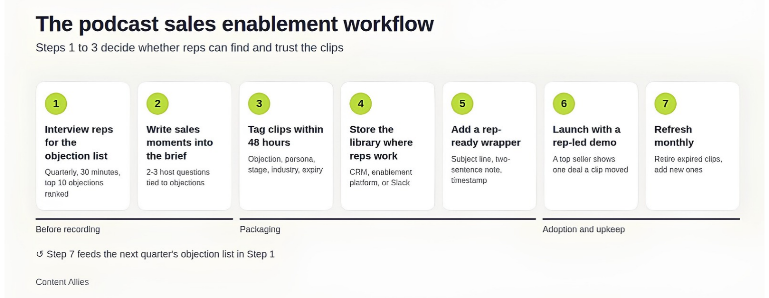
The seven-step podcast sales enablement workflow, from objection list to monthly refresh. Source: Content Allies original
Podcast Sales Email Templates Reps Can Copy
These four templates show how reps can share podcast clips before meetings, after discovery calls, and during active evaluations. Each gives the buyer a specific reason to listen and points directly to the relevant moment.
Replace the names, timestamps, and links with details from your own podcast episodes and sales conversations.
1. Before a Discovery Call
|
Subject: Before our Thursday call Hi [First Name], You mentioned a reporting bottleneck in your booking form. I thought this two-minute clip might be useful. [Guest Name], who leads operations at [Company Name], explains how their team approached a similar problem. Here's the clip, starting at [Timestamp]: [Clip Link] Looking forward to discussing this on Thursday. |
2. After a Discovery Call
|
Subject: Following up on implementation time Hi [First Name], Thanks for the conversation today. You mentioned that your finance team is concerned about the time needed for implementation. This 90-second clip features a CFO explaining how their team assessed implementation timelines before approving a similar project. Listen from [Timestamp]: [Clip Link] Would it make sense to include your finance lead in our next conversation? |
3. Reengaging a Stalled Deal
|
Subject: Thought of our vendor consolidation discussion Hi [First Name], I came across a conversation about consolidating vendors while existing contracts are still active. It reminded me of the timing concerns your team raised last month. The relevant part starts at [Timestamp]: [Clip Link] Thought it might be useful as you revisit your options. Has anything changed on your end? |
4. Helping a Champion Share Content Internally
|
Subject: Three short clips for Friday's evaluation Hi team, Sharing three short clips from industry peers that address some of the questions we've been discussing:
These should provide some useful context ahead of Friday's review. |
The final template is designed for a champion to forward internally. Reps can prepare the message, add the relevant clips, and give the champion something ready to send.
What Should You Budget for Podcast Sales Enablement?
Our B2B podcast cost guide estimates $1,000 to $8,000 a month for in-house production and $2,000 to $20,000 a month with an agency. These figures cover the show itself. Scope clip editing, tagging, suggested rep copy, and analytics separately, and confirm which items are already included.
To assess efficiency, separate opportunities created through podcast relationships from existing opportunities that received podcast content. Define the reporting period and attribution rules before counting either group.
Cost per influenced opportunity = Program cost for the period ÷ Unique opportunities with a documented podcast touch during the period
For example, a program costing $60,000 over six months that touches 30 unique opportunities has a cost per influenced opportunity of $2,000. This does not establish that the podcast created those opportunities. Compare channels only when the cost scope, attribution window, and opportunity definitions match.
How to Measure Podcast Sales Enablement ROI
Measure podcast sales enablement by rep usage, reply rates on clip emails, and pipeline where a clip was sent before close. Sales leaders care about deals that moved, so report those numbers to them.
Audience-side numbers still matter for the content team, and our breakdown of B2B podcast ROI metrics covers those.
| Metric | What it tells you | How to track it | Owner |
|---|---|---|---|
| Rep asset usage rate | Share of reps sending at least one clip per week | Enablement platform or CRM activity log | Sales enablement |
| Clip email reply rate | Whether clips earn responses compared with plain follow-ups | Email sequence A/B split | Sales ops |
| Influenced pipeline | Open and closed pipeline where a clip was sent before close | CRM field or activity tag | RevOps |
| Stage velocity | Days spent in each stage for deals with and without clips | CRM stage history | RevOps |
| Guest-to-opportunity rate | Share of guests from target accounts who become opportunities | CRM source tag per episode | Marketing |
Our Leaders of B2B case study reports 94 C-level executives engaged and 43 sales opportunities generated. It also reports $100,500 in attributable revenue, with more than $100,000 generated in the show's first four months.
These results come from our guest-focused podcast strategy. They show why sales enablement reporting should distinguish opportunities created through guest relationships from existing deals influenced by shared content.
Review rep usage and buyer engagement monthly, then assess pipeline influence and closed-won revenue quarterly. Compare results against your typical sales cycle, and avoid treating every deal that received a clip as podcast-generated revenue.
Should You Build an Internal Sales Enablement Podcast or Arm Reps With Your Public Show?
For buyer-facing sales support, start with relevant excerpts from your existing public show. Choose a private feed when the main need is confidential deal debriefs, onboarding, or competitive training.
| Dimension | Private internal feed | Public branded show |
|---|---|---|
| Audience | Your own reps and partners | Buyers, guests, the market |
| Content | Win stories, competitive intel, product updates | Customer stories, industry problems, expert interviews |
| Security | Access-controlled, can hold confidential details | Public, nothing confidential |
| Distribution | Private RSS, intranet, Slack | Spotify, Apple, YouTube, rep outreach |
| Main payoff | Faster ramp, consistent messaging | Buyer trust, guest relationships, sales assets |
| Metric | Completion rate, ramp time | Influenced pipeline, guest-to-opportunity rate |
Signal Hill Insights' analysis of executive podcast listeners found that 83% had listened in the past week. That describes listening frequency within this audience; it does not establish whether a public or private show should take priority for your team.
If you're weighing a private feed, our guide to private podcasting for employees and partners covers hosting and access control.
What Permissions Should Your Podcast Guest Release Cover?
Check that your podcast guest release addresses the intended uses of excerpts, including sales outreach and proposals. Confirm any restrictions before distribution, and address paid promotion separately if you plan to use it. Avoid presenting a guest's comments as a product endorsement without their explicit approval.
Build a Podcast Your Sales Team Uses With Content Allies
A podcast earns its place in the sales process when episodes address buyer questions and become approved, tagged assets reps can find and share. Plan that work alongside guest booking and production.
At Content Allies, we help B2B companies plan and produce podcasts around the people they want to reach. We'll work with your team to define the sales assets, tagging, and approvals your program needs.
If you want your podcast showing up in deal reviews, contact our team. We'll look at your current show or your plans for one, map it against your sales stages, and show you which assets your reps would get from each episode.
FAQs
Should Sales Reps Share a Prospect's Podcast Episode With Their Colleagues?
Yes, but coordinate with the guest first. Send them the finished episode and ask if they're comfortable with you sharing it internally. Give them the option to introduce it themselves. This respects the relationship while helping the conversation reach other stakeholders at the account.
Does Podcast Sales Enablement Work for a Show With a Few Hundred Listeners?
Yes. The sales value comes from guest relationships and assets reps send one-to-one, and neither depends on audience size. What matters is whether the people you interview, and the people listening, match your target accounts.
How Long Should a Sales Clip Run in Email, LinkedIn Messages and Proposals?
Aim for 30–90 seconds in emails and LinkedIn messages, covering one specific buyer question or objection. For proposals, a short quote or timestamped excerpt may be easier to review. Longer clips make sense when prospects request a detailed explanation or want to hear the full discussion.
How Do You Attribute Pipeline When a Clip Is Forwarded Inside a Buying Committee You Cannot See?
Use a player with playback analytics and share links that start at the relevant moment. Track link clicks separately from plays. Ask the champion which stakeholders received the content and record that evidence on the opportunity. Forwarded links may not identify individual viewers, so report the limits of what you can observe.