
How to Edit a Podcast: A Complete B2B Post-Production Workflow
A 60-minute conversation with a VP or founder can produce plenty of valuable insights for a B2B podcast. But turning that raw recording into a publishable episode takes careful editing, audio cleanup, quality checks, and one consolidated approval round. The file may pass between the editor, host, guest, and legal team before the episode goes live.
The audience on the other end has high expectations. Senior executives who listen to podcasts are more than twice as likely to be power listeners (5+ hours a week) than other listeners, according to Signal Hill Insights. Poor audio, awkward cuts, and unnecessary tangents can make even a valuable conversation difficult to follow.
This guide covers a 10-step podcast editing workflow for B2B companies, from organizing raw recordings to producing an approved, platform-ready episode and promotional clips.
P.S. Podcast editing can become a time-consuming process when multiple stakeholders need to review each episode. Our B2B podcast production team manages the complete workflow for shows like Meta's Business, Innovation and Technology podcast. Book a free strategy call to discuss your production needs.
How Do You Edit a Podcast?
You edit a podcast by fixing the story first, then the sound, then the packaging. For a B2B show, the full workflow looks like this:
Organize and back up the raw recording files.
Transcribe the episode and build an edit plan.
Make the editorial edit (structure, tangents, cold open).
Clean up filler words, pauses and crosstalk.
Repair and enhance the audio.
Add intros, outros, music, sound effects and branded elements.
Prepare the review mix.
Prepare the video rough cut.
Run the guest and stakeholder approval round.
Master, export and QA the approved episode.
Editing a podcast isn't hard to learn, but it's easy to do slowly. The order above is what keeps it fast.
At Content Allies, we treat post-production as part of the business relationship. In B2B, the guest is mostly a prospect, a partner or a customer, so the edit decides how that person sounds in front of their peers.
We also make every editorial decision before anyone opens a noise-reduction plugin, because EQ can't fix a rambling answer or a buried insight.
We also edit once for every channel: the full episode, the short clips and the companion article all come from the same approved cut, so nothing published ever contradicts what the guest signed off on.
What Is Podcast Editing? Editing vs. Mixing vs. Mastering
Podcast editing is the post-production stage where raw recordings are cut, cleaned, structured and finished into a publishable episode. People use "editing" for the whole job, which includes editing, mixing and mastering. Completing the editorial cut before detailed audio cleanup reduces rework.
| Stage | What it fixes | Typical tools | Output |
|---|---|---|---|
| Editing | Story, structure, mistakes, filler words, pacing | Descript, Riverside, Audition, Audacity | A tight, correctly ordered rough cut |
| Mixing | Balance between voices, music beds, sound effects, sound design, noise | Audition, Reaper, iZotope RX, Auphonic | Voices that sit at the same level with clean backgrounds |
| Mastering | Final loudness, peaks, file format and bitrate | Auphonic, Audition, Hindenburg | A file that meets platform specs |
Mastering has a concrete finish line: Apple's published loudness spec. Step 7 sets the review mix target; Step 10 completes the final master after approval.
Video podcast editing adds a fourth layer on top of these three: camera switching, captions and on-screen graphics. That gets its own step too, because most B2B shows now publish on YouTube as well as in audio apps.
How Is B2B Podcast Editing Different From Editing a Creator Podcast?
B2B podcast editing serves three audiences at once: the listener, the guest and the internal stakeholders who approve what the brand says. A creator show mostly answers to the first.
| Dimension | Creator or hobby podcast | B2B company podcast |
|---|---|---|
| Main goal | Entertain and grow an audience | Build authority and relationships with target accounts |
| Who approves the edit | The host | Host, marketing lead, sometimes the guest and legal |
| What gets cut | Dead air and boring stretches | Also confidential details, unreleased numbers, unapproved customer names |
| Brand rules | Loose, personality-driven | Fixed intro, music, CTA and visual identity across the series |
| Compliance review | Rare | Common in finance, healthcare, legal and other regulated industries |
| Outputs per episode | Audio file, maybe a video | Audio, video, clips, show notes, article, LinkedIn posts |
| Turnaround pressure | Self-imposed | Tied to campaigns, events and the guest's own promotion |
Three things follow from this table.
Guest credibility comes first. Your guest might be a buyer at a target account. Cut the stumbles that make them sound unsure, and keep the proof points that make them sound sharp.
Some cuts are about risk. A guest mentioning an unannounced partnership or a customer by name can turn into a real problem after publishing.
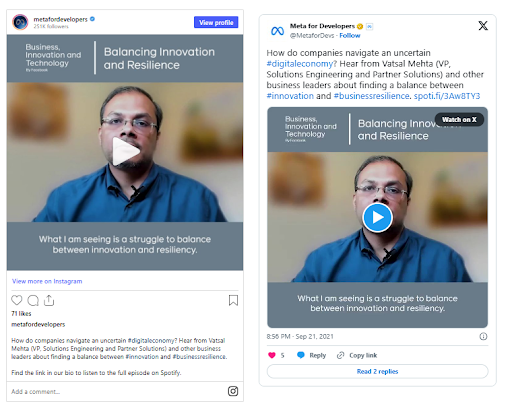
Repurposing is part of the brief. For Meta's Business, Innovation and Technology podcast, our team at Content Allies worked on episodes featuring guests from Salesforce, LinkedIn, SAP, and Boston Consulting Group. Each episode was repurposed into a full-length YouTube video, a thought leadership article, and social clips.
Our Meta podcast production case study shows how we managed these deliverables as part of the production workflow.
How to Edit a Podcast: The 10-Step B2B Post-Production Workflow
A good podcast post-production workflow makes story decisions first, technical polish second, and gets approvals before the final master and video export.
Each step below hands a clean input to the next one.
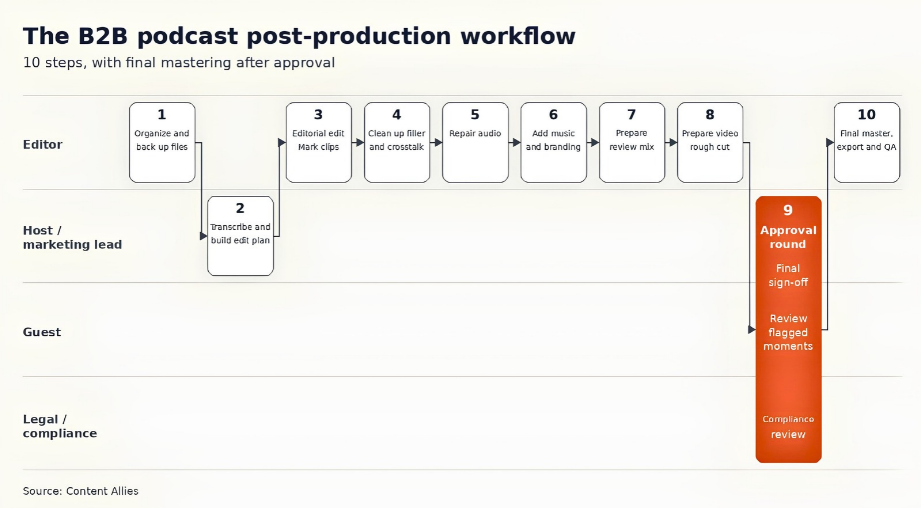
The 10-step B2B podcast post-production workflow, and who owns each step. Steps 7 and 8 prepare review versions; Step 10 completes final mastering after approval. Source: Content Allies original
Step 1: Organize and Back Up the Raw Recording Files
Start by putting every file where you can find it again.
Record each speaker on a separate audio track, ideally as 48 kHz WAV files captured locally on each guest's machine. Separate tracks let you fix one voice without touching the other. If your show is recorded remotely, our remote podcast recording guide covers how to set that up.
Name files with one convention, for example, showname_ep042_2026-10-13_host.wav.
Back up the raw files before you make a single cut.
Open a saved session template in your editor so tracks, routing and effects load the same way every time.
Step 2: Transcribe the Episode and Build an Edit Plan
Generate a transcript first and edit from it. A transcript lets the host or marketing lead mark cuts in a doc, which is far faster than scrubbing through a waveform.
Your edit plan should include:
Target length. Decide it before cutting. Riverside's own data puts the average finished episode at about 37 minutes.
A punch list. Timestamped notes, each tagged as a content edit or a sound edit. Buzzsprout's editing guide recommends this split, and it keeps the editorial pass separate from the technical one.
The cold-open moment. Identify the answer you'll pull to the top of the episode.
Guest flags. Anything the guest or legal should see before publishing.
Text-based editors such as Descript and Riverside turn this plan into the edit itself: delete a sentence in the transcript and the audio and video cut with it.
Step 3: Make the Editorial Edit First
The editorial edit shapes what the episode says. Do it before any audio processing, since there's no point polishing a section you're about to remove.
Cut the warm-up small talk, tangents and repeated answers.
Reorder segments when the best insight lands in minute 48.
Build the cold open from the strongest 30 to 60 seconds. Tag clip candidates with markers in the edit session so nobody has to re-listen to the full episode later.
Keep the guest's proof points, numbers and stories intact.
Send anything sensitive to the approval round (Step 9) as a flag, and leave it in the cut for now. A signed podcast guest release should spell out how those review requests work.
You can use this table for the calls that come up in almost every B2B interview:
| Content type | Cut, keep or flag | Why |
|---|---|---|
| Off-the-record comments | Cut | The guest said it in confidence |
| Competitor names said critically | Flag | Can create legal or partner friction |
| Pricing or unreleased figures | Flag | Often not approved for public use |
| Customer names | Flag | Needs the customer's permission |
| Long product pitch from the host | Cut or trim | Listeners skip it, and it weakens trust |
| Technical deep dive | Keep | Usually the most valuable part for a specialist audience |
| Small talk before the first question | Cut | Delays the value |
Let the content set the final length: a 55-minute episode where every answer earns its place beats a 35-minute one that loses the guest's best story.
Step 4: Clean Up Filler Words, Pauses and Crosstalk
This step is word-level cleanup inside the structure you already set.
Remove filler words ("um," "you know," "sort of") where they distract, and leave some in where they carry natural rhythm.
Tighten long pauses and false starts.
Fix crosstalk by muting the off-mic track while the other person speaks, which is one more reason to record separate tracks.
Use matching room tone and short fades where needed to smooth edits.
Reduce loud breaths, but don't strip every one.
Listen back at 1x speed after each section. Over-edited executives sound robotic, and listeners notice even when they can't name what's off.
Step 5: Repair and Enhance the Podcast Audio
Run audio repair as a fixed processing chain so every episode sounds the same.
Remove background noise (hum, fans, HVAC) with a noise-reduction tool such as iZotope RX or Adobe Podcast Enhance.
Apply a high-pass filter around 70 to 80 Hz to remove low rumble.
EQ each voice for clarity, usually a small cut in muddy low-mids.
De-ess harsh "s" sounds.
Compress gently to even out loud and quiet phrases.
Match levels between speakers.
In a study published in Science Communication, researchers Eryn Newman and Norbert Schwarz found that when the same talks were played with poor audio quality, listeners rated the speaker as less intelligent and the research as less important, even when the speaker's credentials were stated.
For a B2B show built on expertise, bad sound costs credibility.
Step 6: Add Intros, Outros, Music, Sound Effects and Branded Elements
Build a reusable episode template once and drop each new episode into it. The template should include:
A branded intro and outro with the same music every episode
Music beds under the cold open and transitions
Sound effects used sparingly, for transitions only
A fixed CTA read (newsletter, demo, next episode)
Slots for sponsor or internal promo reads
Consistency across a series helps listeners recognize the show within the first few seconds. Use licensed music only, and keep the license documents with the project files. Document the sonic rules in your podcast brand guidelines so every editor follows the same standards.
For example, our team at Content Allies created a complete brand package for Tonkean's Modern Business Operations podcast, including music selection. We also handled the show's production, and within six months, it became the top podcast in its category on Spotify.
Read our Tonkean podcast production case study.
Step 7: Prepare the review mix
Prepare a review mix with balanced voices and music. Aim for about -16 LKFS integrated loudness and true peaks no higher than -1 dBFS, following Apple's recommendation. Complete the final master after approval in Step 10.
| Platform | Loudness target or normalization | True peak | File format | Source |
|---|---|---|---|---|
| Apple Podcasts | -16 LKFS (±1 dB) | -1 dBFS or lower | AAC preferred or MP3; 128 to 256 kbps stereo, 64 to 128 kbps mono | Apple |
| Spotify | Use the same -16 LKFS master | Recommended: -1 dBFS or lower | Pulled from your host's RSS file | Workflow recommendation |
| Your hosting RSS feed | Same -16 LKFS master | -1 dBFS | Same as Apple | Apple spec |
| YouTube | No published podcast-specific spec | -1 dBFS | MP4 with AAC audio from the video export | Use the -16 master |
Use one -16 LKFS master as the workflow default. Measure the review mix with a loudness meter such as Auphonic, Audition's Loudness Meter or Youlean. Recheck the final master in Step 10.
Step 8: Prepare the video rough cut
Build the video rough cut from the same editorial audio cut so both versions match word for word. Submit the review versions for approval in Step 9.
Switch cameras to the active speaker, and cut to a wide shot every so often to show both people.
Add burned-in or uploaded captions, since clips in social feeds often autoplay on mute.
Add lower thirds with each executive's name, title and company.
Apply the brand frame, colors and end card.
Color-match cameras so the host and guest don't look like they're in different rooms.
Video matters for reach. YouTube reports more than 1 billion monthly podcast viewers.
But audio still carries most consumption: Cumulus Media and Signal Hill found that 92% of weekly podcast consumers reported listening, while 8% reported watching only.
So the video has to work as audio too: no "as you can see on the screen" moments without a verbal description.
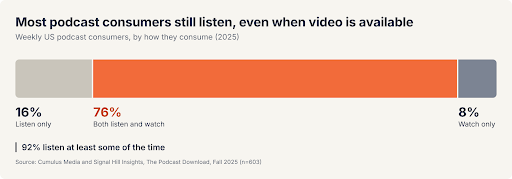
How weekly podcast consumers split between listening and watching. Source: Cumulus Media and Signal Hill Insights, 2025
Step 9: Run the Guest and Stakeholder Approval Round
Run one structured approval round so feedback doesn't turn into endless re-edits.
Share a review link with timestamped commenting (Descript, Frame.io or your agency's portal).
Set one consolidated feedback deadline. Three to five business days works for most guests.
Send the guest only the flagged moments from Step 3, with timestamps.
Route the full cut to legal or compliance when your industry requires it. Our guide to podcast compliance for regulated B2B companies covers what reviewers look for.
Name versions clearly: v1_rough, v2_review, v3_approved.
Assign one person who gives the final sign-off.
Insider tip: in our experience, guests asked to review a full 45-minute cut tend to request new changes they wouldn't have raised otherwise. Guests shown two flagged clips usually approve them quickly.
Step 10: Master, export and QA the approved episode
Apply the consolidated feedback to both versions. Master the approved audio to about -16 LKFS, with true peaks no higher than -1 dBFS, then export the final audio and video files. Run the QA checklist before anything goes live.
| Check | What to look for | Pass criteria |
|---|---|---|
| Full listen-through | Missed cuts, clicks, repeated words | Listened at 1x, start to finish |
| Loudness | Integrated loudness and true peak | About -16 LKFS, true peak -1 dBFS or lower |
| Speaker levels | One voice louder than the other | Within about 1 dB of each other |
| Intro and outro | Correct music, CTA and episode number | Matches the template |
| Chapter markers | Logical sections with clear titles | Present in the file or host |
| Transcript | Accurate text and speaker names | VTT with speaker labels delivered through RSS or uploaded for subscriber episodes |
| Metadata and show notes | Title, description, guest links | Proofread and approved |
| Video captions | Sync and spelling of names | Spot-checked at three points |
Transcripts deserve special attention. Apple has generated transcripts automatically since March 2024. For ordinary RSS episodes, provide a VTT file with speaker labels through your host using the RSS transcript tag. For subscriber episodes, upload a VTT or SRT file in Apple Podcasts Connect. An auto-transcript that misspells your guest's company is a small, avoidable embarrassment.
How to Edit a Podcast for Repurposing Into Clips, Show Notes and Blog Posts
Use the clip markers from Step 3 to cut every derivative asset from the approved master. Our guide to repurposing podcast content covers distribution; the table below covers the edit spec for each asset.
| Asset | Where it comes from | Edit spec | Channel |
|---|---|---|---|
| Short vertical clips | Strongest 30 to 60 second answers | 9:16, captions, hook in the first 3 seconds | LinkedIn, YouTube Shorts, Instagram |
| Audiograms | Quotable audio moments | Waveform plus captions, 30 to 60 seconds | LinkedIn, X |
| Quote graphics | One-line insights from the transcript | Brand template, guest photo and title | LinkedIn, newsletter |
| Show notes | Transcript and chapter markers | Summary, timestamps, guest links | Podcast apps, website |
| SEO blog article | Transcript, restructured by topic | 1,000+ words around one search query | Company blog |
| LinkedIn posts | Key takeaways | Native text post per insight | Host and company pages |
| Guest promo kit | Clips, graphics and copy | Ready-to-post bundle | Guest's own channels |
Sagemark HR's host spent about two hours a week on interviews while Content Allies handled audio editing, clips and LinkedIn posts for every episode. The show led to nine new clients for his recruiting business, and the guests themselves became part of his network.
Export clips only after the approval round, since a flagged line that ends up in a viral clip is much harder to pull back.
How Long Does It Take to Edit a Podcast?
Plan on roughly 2 to 5 hours of podcast editing per recorded hour for a polished interview.
| Edit level | What's included | Typical time per recorded hour | Best for |
|---|---|---|---|
| Light cleanup | Trim start and end, level, add intro and outro | Under 1 hour | Internal or informal shows |
| Standard interview | Editorial cuts, filler removal, audio repair, mastering | 2 to 5 hours | Most B2B audio podcasts |
| Full B2B production | Standard edit plus video, approvals and asset kit | Multiple working days across a team | Company shows on YouTube and LinkedIn |
| Narrative or documentary | Scripted structure, sound design, multiple sources | 6+ hours | Branded series and storytelling shows |
For a weekly or biweekly B2B show, this example allows five business days for review. All days below are working days:
Day 0: Record.
Day 1: Transcript and edit plan.
Days 2 to 3: Editorial and technical edit.
Day 4: Review mix and video rough cut.
Days 5 to 9: One consolidated review window.
Day 10: Final master, video export and QA.
Days 11 to 12: Asset kit, then publish.
If keeping this calendar on track is the hard part, our podcast production services handle every step except the review window, which stays with your team.
What Are the Most Common Podcast Editing Mistakes?
The most common podcast editing mistake is polishing audio before the story is settled, which means cleaning sections that get cut an hour later. Most of the others are easy to spot once you know where to look. Each fix below points to the step that covers it.
| Mistake | What it causes | Fix |
|---|---|---|
| Polishing audio before the editorial cut | Hours spent on sections that get deleted | Make the editorial edit first (Step 3) |
| Recording everyone on one mixed track | Crosstalk and level problems you can't separate | Record one track per speaker (Step 1) |
| Cutting every filler word and breath | An executive who sounds robotic | Cut what distracts, keep natural rhythm (Step 4) |
| Mastering by ear | Episodes louder or quieter than the rest of the feed | Check the final master with a loudness meter (Step 10) |
| Editing audio and video separately | Two versions that don't match word for word | Build both review versions from the same editorial cut (Step 8) |
| Sending guests the full cut for review | New change requests and a slipped publish date | Send only flagged moments (Step 9) |
What Is the Best Podcast Editing Software?
The best podcast editing software depends on your production needs, editing experience, and budget. Some tools focus on transcript-based editing, while others offer detailed audio mixing, noise reduction, or automated post-production.
The right choice also depends on whether you're producing audio-only episodes, video podcasts, or both.
| Tool | Editing style | Best for | Price |
|---|---|---|---|
| Descript | Text-based plus timeline editor | Marketers editing audio and video from a transcript | Free tier; paid plans from $16 per person per month, billed annually; $24 with monthly billing |
| Riverside | Recording plus text-based editing | Remote recording and quick edits in one tool | Free tier; paid plans |
| Adobe Audition | Timeline editor (DAW) | Detailed audio repair and mixing | Creative Cloud subscription |
| Audacity | Timeline editor | Free, basic audio editing | Free |
| Reaper | Timeline editor (DAW) | Engineers who want speed and custom workflows | Low-cost license |
| Hindenburg | Timeline editor built for spoken word | Journalists and narrative shows | Paid license |
| Auphonic | Automated leveling and loudness | Hitting -16 LKFS consistently | Free monthly credits; paid plans |
| Adobe Podcast Enhance | AI voice cleanup | Rescuing poor-quality remote audio | Free and premium tiers |
| iZotope RX | Audio repair suite | Removing noise, clicks and reverb | Paid tiers |
If you're choosing a recording platform as well, our Riverside vs. Zencastr comparison breaks down the trade-offs.
How to Edit a Podcast With Free Software
You can edit a podcast entirely with free software. Audacity is the standard choice:
Import each speaker's track.
Cut mistakes and tangents with the selection tool.
Use Noise Reduction on a sample of room noise.
Apply the Compressor and a high-pass filter.
Use Loudness Normalization to hit -16 LUFS.
Export as MP3.
GarageBand is the free option on a Mac, and Descript and Adobe Podcast both have free tiers. The limits show up with video, team review and version control, which is where B2B shows usually outgrow free tools.
Can You Use AI to Edit a Podcast?
AI tools handle the mechanical parts of podcast editing well, and the judgment calls poorly. Here's where to draw the line.
| Task | Hand it to AI | Keep it human |
|---|---|---|
| Transcription | Yes | Proofread names and jargon |
| Filler word detection | Yes | Review before deleting |
| Noise removal and leveling | Yes | Check for artifacts |
| Clip suggestions | Yes, as a shortlist | Pick final clips |
| Editorial structure | No | Decide what the episode says |
| Guest framing and sensitive cuts | No | Always a human call |
| Compliance decisions | No | Legal or compliance reviewer |
The split matters because the audience is large and paying attention. Edison Research's Podcast Consumer 2026 report estimates that 58% of Americans 12 and older consumed a podcast in the past month. Use AI to speed up the work, but keep a human accountable for every editorial call.
Should You Edit Your Podcast In-House or Outsource It?
Keep podcast editing in-house if you have a trained editor and a short approval chain. Outsource to a professional editor or agency once episodes include video, an asset kit and multi-stakeholder review.
This section covers how to decide.
Pricing varies widely, and our B2B podcasting cost breakdown covers the full picture.
For editing specifically, the Association of Independents in Radio's 2025 rate guide puts independent audio engineers at $75 to $200 an hour.
Before hiring anyone, check five things:
Sample edits from B2B or interview shows
A written turnaround commitment per episode
How many revision rounds are included
Whether they master to a stated loudness spec and deliver VTT transcripts
Who owns the raw files and project sessions
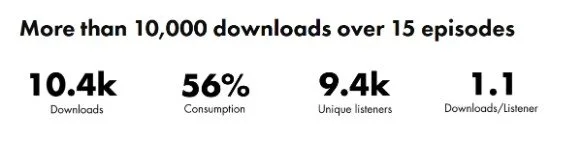
Gusto Embedded is a good example of when outsourcing pays off. Their team handed off audio and video editing, publishing, and promotion to our team at Content Allies, and the show went on to surpass 10,000 downloads across 15 episodes.
Turn Every Recording Into a Revenue Asset With Content Allies
Content Allies runs the full post-production workflow above for B2B brands. An engineer joins every recording. Our team handles the editorial and technical edit, the video version, the approval round with your guests and stakeholders, and the asset kit that turns one conversation into a month of content.
Meta's podcast beat its four-month download target by 7x and reached about 170,000 downloads in its first six months with us.
If your team is spending more time chasing edits than talking to guests, let's talk about your podcast. We can review your current workflow, identify where episodes get held up, and discuss how our team can take post-production off your plate.
FAQs
Can You Edit a Podcast After It's Published?
Yes. Most podcast hosts let you replace an episode's audio file, and podcast apps pull the new file from your RSS feed. Listeners who already downloaded the old version keep it until they delete it, so fix a sensitive mistake fast. Replace the file inside the same episode in your host, so apps don't treat the fix as a new episode.
How Do You Edit a Podcast on Your Phone?
Use GarageBand on an iPhone or iPad for audio, and CapCut on iOS or Android for video podcast clips. Both handle trimming, cutting and adding music.
A phone works for quick fixes and social clips. Multitrack cleanup, loudness mastering and a review round for a full B2B episode are still easier on a computer.
How Do You Edit a Podcast in GarageBand?
Create an empty project, add one audio track per speaker and drag each recording in. Then:
Trim dead space by dragging the edges of each region.
Split regions at the playhead to cut mistakes, then delete the unwanted pieces.
Balance the speakers with each track's volume slider or volume automation.
Add intro and outro music on a separate track.
Export with Share > Export Song to Disk as AAC or MP3.
GarageBand has no loudness target setting, so run the export through Auphonic or another loudness tool before you publish.
How Do You Sync Video and Audio for a Video Podcast?
Line up the separate microphone audio with each camera's footage, then mute the camera audio. A clap at the start of the recording gives you a sharp spike to match by eye.
Premiere Pro and DaVinci Resolve can also sync clips automatically by matching audio waveforms. Riverside and Descript record synced tracks, so this step disappears if you record in either.
How Do You Work With a Remote Podcast Editor?
Give a remote editor three things: the raw speaker tracks in a shared cloud folder, your edit plan and punch list, and your episode template and brand guidelines. Agree on a turnaround per episode in writing, and collect feedback through timestamped review links. Don't email compressed exports, because the editor needs the original files to repair audio.